A well-customized WordPress blog performs better, ranks higher, and provides a superior user experience. Discover the essential plugins, setup process, customization tips, and best practices to build a secure, fast, and professional blog.
Introduction
Installing WordPress is only the beginning of creating a successful blog. To build a website that is fast, secure, visually appealing, and optimized for search engines, you need to customize it with the right settings and plugins. Proper blog customization enhances user experience, improves website performance, and creates a strong foundation for future growth.
Many beginners install dozens of plugins without understanding their purpose. While plugins extend WordPress functionality, using too many or choosing poorly coded plugins can slow down your website, create security vulnerabilities, and cause compatibility issues. The key is selecting only high-quality plugins that provide real value.
Customization goes beyond plugins. It includes configuring permalinks, optimizing navigation, setting up SEO, improving security, enabling backups, enhancing page speed, and creating a consistent brand identity. These optimizations ensure that your website not only looks professional but also performs efficiently across desktops, tablets, and mobile devices.
The right setup can significantly improve SEO, Core Web Vitals, page loading speed, and visitor engagement. It also simplifies website management by automating updates, backups, spam protection, and performance optimization.
In this comprehensive guide, you'll learn how to customize your WordPress blog using essential plugins, configure important settings, optimize performance, and avoid common mistakes while creating a professional website.
At Argenius, we develop customized WordPress websites that combine beautiful design, technical SEO, strong security, and exceptional performance to help businesses grow online.
What is Blog Customization?
Blog customization is the process of configuring and enhancing your WordPress website to improve its appearance, functionality, security, speed, and overall user experience.
It includes:
- Theme Configuration
- Plugin Installation
- SEO Settings
- Security Setup
- Website Speed Optimization
- Navigation Design
- Branding
- Homepage Layout
- Contact Forms
- Performance Improvements
Customization transforms a basic WordPress installation into a professional website.
Why Blog Customization Matters
Proper customization provides numerous benefits.
It helps you:
- Improve User Experience
- Increase Website Speed
- Enhance SEO
- Strengthen Website Security
- Improve Branding
- Increase Engagement
- Reduce Bounce Rate
- Simplify Website Management
- Improve Mobile Experience
- Support Long-Term Scalability
A well-optimized blog performs better for both visitors and search engines.
Essential WordPress Settings
Before installing plugins, configure these important settings.
General Settings
Configure:
- Site Title
- Tagline
- Time Zone
- Language
- Admin Email
Permalink Settings
Use an SEO-friendly permalink structure.
Recommended:
Avoid URLs containing unnecessary numbers or dates.
Reading Settings
Configure:
- Homepage
- Blog Page
- Number of Posts
- Search Engine Visibility
Discussion Settings
Enable:
- Comment Moderation
- Spam Protection
- User Notifications
Disable features you don't plan to use.
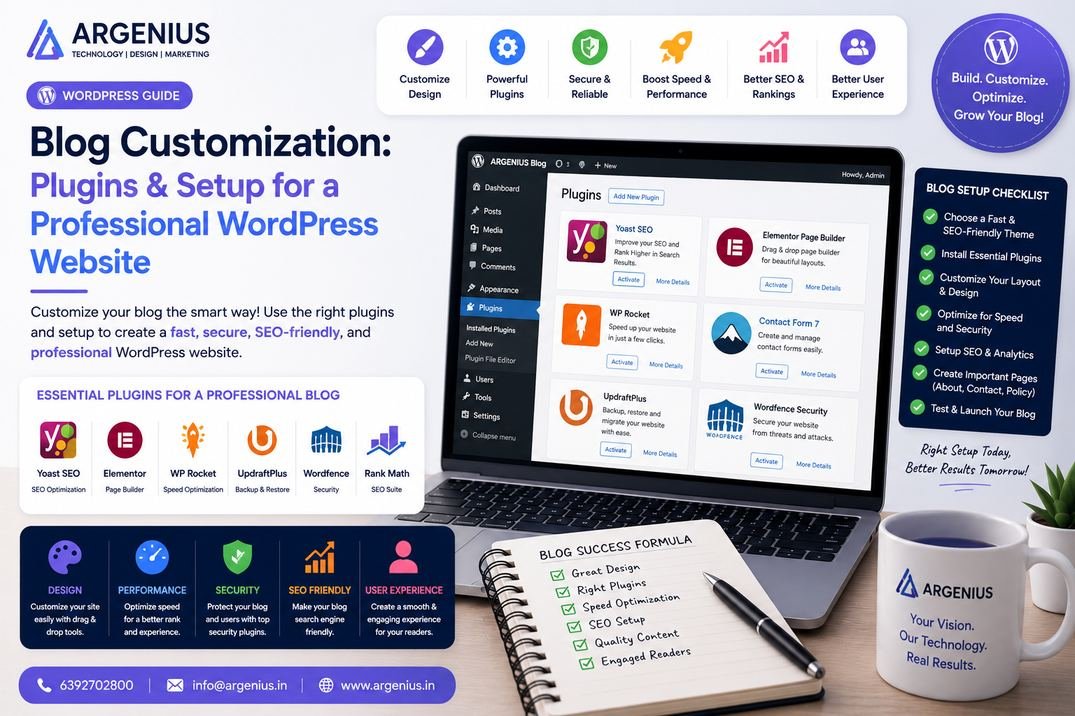
Essential Plugin Categories
Every professional WordPress blog should include plugins for:
- SEO
- Security
- Backups
- Performance
- Caching
- Image Optimization
- Contact Forms
- Analytics
- Spam Protection
- Website Optimization
Choose plugins that are actively maintained and compatible with your version of WordPress.
Best SEO Plugins
Popular options include:
- Rank Math
- Yoast SEO
- All in One SEO
Features include:
- XML Sitemap
- Meta Tags
- Schema Markup
- Redirect Manager
- SEO Analysis
- Breadcrumbs
These plugins help optimize your content for search engines.
Best Security Plugins
Recommended security plugins:
- Wordfence
- Solid Security
- Sucuri Security
Key features:
- Firewall
- Malware Scanning
- Login Protection
- Two-Factor Authentication
- File Monitoring
- Brute Force Protection
Security should always be a priority for every website.
Best Performance Plugins
Performance optimization plugins include:
- LiteSpeed Cache
- WP Rocket
- W3 Total Cache
Benefits:
- Faster Loading Speed
- Browser Caching
- CSS & JavaScript Optimization
- Database Cleanup
- Lazy Loading
- CDN Integration
These plugins improve Core Web Vitals and user experience.
Common Customization Mistakes
Avoid these common mistakes:
- Installing Too Many Plugins
- Using Poorly Rated Plugins
- Ignoring Plugin Updates
- Skipping Website Backups
- Ignoring Security
- Overloading the Homepage
- Using Heavy Themes
- Forgetting Mobile Optimization
A simple, optimized website often performs better than one overloaded with unnecessary features.
Best Plugin Recommendations
Installing the right plugins can significantly improve your website's performance, security, SEO, and user experience. However, quality is more important than quantity. A well-optimized blog usually needs only a handful of reliable plugins.
SEO Plugins
Recommended:
- Rank Math
- Yoast SEO
- All in One SEO
Key Features:
- XML Sitemap
- Schema Markup
- Meta Titles & Descriptions
- Redirect Management
- SEO Analysis
- Breadcrumbs
- Social Media Metadata
Caching & Speed Plugins
Recommended:
- WP Rocket
- LiteSpeed Cache
- W3 Total Cache
Benefits:
- Faster Loading Pages
- Browser Caching
- CSS & JavaScript Minification
- Lazy Loading
- CDN Integration
- Database Optimization
Security Plugins
Recommended:
- Wordfence Security
- Solid Security
- Sucuri Security
Essential Features:
- Malware Scanning
- Firewall Protection
- Login Security
- Brute Force Protection
- File Monitoring
- Security Alerts
Backup Plugins
Recommended:
- UpdraftPlus
- BackupBuddy
- Jetpack Backup
Benefits:
- Automatic Backups
- One-Click Restore
- Cloud Storage Integration
- Scheduled Backups
Contact Form Plugins
Popular choices:
- WPForms
- Fluent Forms
- Contact Form 7
These plugins help capture leads and improve communication with visitors.
Image Optimization Plugins
Recommended:
Benefits:
- Smaller Image Sizes
- Faster Loading
- Better Core Web Vitals
- Improved SEO Performance
Analytics Plugins
Recommended:
- Site Kit by Google
- MonsterInsights
- Independent Analytics
Track:
- Visitors
- Traffic Sources
- Popular Pages
- Search Performance
- User Behavior
- Conversions
Complete Blog Setup Checklist
Before launching your blog, ensure you've completed the following:
- Install WordPress
- Configure General Settings
- Set SEO-Friendly Permalinks
- Install a Lightweight Theme
- Configure Navigation Menus
- Create Essential Pages
- Install SEO Plugin
- Install Security Plugin
- Configure Caching
- Enable Image Optimization
- Install Backup Solution
- Configure Analytics
- Add Contact Form
- Set Up XML Sitemap
- Configure Robots.txt
- Connect Google Search Console
- Connect Google Analytics
- Test Mobile Responsiveness
- Optimize Website Speed
- Check Broken Links
Completing this checklist provides a strong foundation for long-term success.
Performance Optimization
A fast website improves user experience and search engine rankings.
Optimize your blog by:
- Choosing Lightweight Themes
- Compressing Images
- Using Browser Caching
- Enabling Lazy Loading
- Using a CDN
- Removing Unused Plugins
- Optimizing the Database
- Updating PHP Version
- Reducing HTTP Requests
- Enabling GZIP Compression
These optimizations improve Core Web Vitals and page speed.
Security Best Practices
Protect your WordPress blog with these practices:
- Enable SSL Certificate
- Use Strong Passwords
- Enable Two-Factor Authentication
- Keep WordPress Updated
- Update Themes Regularly
- Update Plugins Frequently
- Limit Login Attempts
- Perform Daily Backups
- Scan for Malware
- Remove Unused Plugins & Themes
Strong security reduces the risk of hacking and data loss.
Plugin Cost Comparison (₹ INR)
| Plugin Type |
Estimated Cost |
| SEO Plugin |
₹0 – ₹10,000 / Year |
| Caching Plugin |
₹0 – ₹6,000 / Year |
| Security Plugin |
₹0 – ₹12,000 / Year |
| Backup Plugin |
₹0 – ₹8,000 / Year |
| Image Optimization |
₹0 – ₹6,000 / Year |
| Premium Plugin Bundle |
₹15,000 – ₹40,000 / Year |
Factors Affecting Plugin Costs
The total investment depends on:
- Free vs Premium Version
- License Duration
- Number of Websites
- Support Availability
- Feature Set
- Automatic Updates
- Cloud Services
- Third-Party Integrations
Only purchase premium plugins if they provide features your website genuinely needs.
Must-Have Plugins for Every Blog
A professional WordPress blog should include plugins for:
- SEO
- Website Security
- Performance Optimization
- Automatic Backups
- Contact Forms
- Image Compression
- Spam Protection
- Analytics
- Redirect Management
- Database Optimization
Avoid installing multiple plugins that perform the same function, as this can create conflicts and reduce performance.
Best Practices
Follow these best practices when customizing your WordPress blog:
- Install only trusted plugins.
- Keep plugins updated.
- Remove inactive plugins.
- Use a lightweight theme.
- Regularly test website speed.
- Schedule automatic backups.
- Monitor security logs.
- Optimize images before uploading.
- Keep branding consistent.
- Test changes on a staging site before deploying them live.
These habits help maintain a fast, secure, and reliable website.
Common Mistakes to Avoid
Avoid these common customization mistakes:
- Installing too many plugins
- Using outdated plugins
- Ignoring plugin compatibility
- Skipping backups
- Forgetting security updates
- Choosing heavy themes
- Ignoring mobile optimization
- Not testing after updates
- Over-customizing the design
- Using plugins from untrusted sources
Avoiding these issues improves website stability and performance.
Future Trends in WordPress Customization
WordPress customization continues to evolve with new technologies.
Emerging trends include:
- AI-Powered Website Builders
- Block-Based Full Site Editing
- No-Code Website Customization
- AI Content Assistance
- Automatic Performance Optimization
- Headless WordPress
- Cloud-Based Development
- Enhanced Accessibility Features
- Smarter Security Systems
- Personalized User Experiences
These innovations make WordPress websites more powerful and easier to manage.
Why Businesses Choose Argenius
At Argenius, we create customized WordPress websites that combine excellent design, technical optimization, and business-focused functionality.
Our services include:
- WordPress Website Development
- Custom Blog Setup
- Plugin Configuration
- Technical SEO
- Website Speed Optimization
- Security Hardening
- Performance Audits
- Website Migration
- Ongoing Maintenance
- Digital Marketing Services
We build WordPress websites that are secure, scalable, and optimized for long-term growth.
Final Thoughts
Customizing your WordPress blog is about creating a website that performs efficiently while delivering an excellent experience to your visitors. The right combination of plugins, optimized settings, and thoughtful design improves SEO, website speed, security, and overall usability. Instead of installing every available plugin, focus on choosing high-quality tools that solve specific problems and work well together.
A clean, lightweight, and well-maintained WordPress website is easier to manage, ranks better in search results, and scales more effectively as your audience grows. Regular updates, performance monitoring, and security best practices will help keep your website reliable for years to come. At Argenius, we help businesses build customized WordPress websites that balance functionality, performance, and long-term digital success.
Frequently Asked Questions
How many plugins should a WordPress blog have?
There is no fixed number. Install only the plugins you genuinely need. A well-optimized website often performs well with 10–20 high-quality plugins rather than a large collection of unnecessary ones.
Which SEO plugin is best for WordPress?
Popular options include Rank Math, Yoast SEO, and All in One SEO. Each offers features such as XML sitemaps, schema markup, meta optimization, and content analysis.
Can too many plugins slow down my website?
Yes. Poorly coded or unnecessary plugins can increase loading times, consume server resources, and create compatibility issues. Quality is more important than quantity.
Are premium plugins worth buying?
Premium plugins are worthwhile when they provide valuable features, better support, regular updates, and performance improvements that free alternatives don't offer.
How often should I update WordPress plugins?
Check for updates regularly and apply them after testing compatibility. Keeping plugins updated improves security, stability, and performance.
Does Argenius help with WordPress customization?
Yes. Argenius provides WordPress customization, plugin configuration, technical SEO, performance optimization, website security, migration, and ongoing maintenance to help businesses build high-performing websites.