Choosing the right blog hosting is crucial for your website's speed, security, SEO, and overall performance. This complete guide compares Shared Hosting and Managed WordPress Hosting to help you select the best hosting solution for your blog and long-term business growth.
Introduction
Selecting the right hosting is one of the most important decisions when building a blog. Your hosting provider directly affects your website's speed, security, SEO, uptime, and user experience. Even if you publish excellent content, poor hosting can slow down your website, reduce search rankings, and drive visitors away.
When researching hosting options, you'll frequently encounter two popular choices: Shared Hosting and Managed WordPress Hosting. While both allow you to host a WordPress website, they differ significantly in terms of performance, maintenance, scalability, support, and overall value.
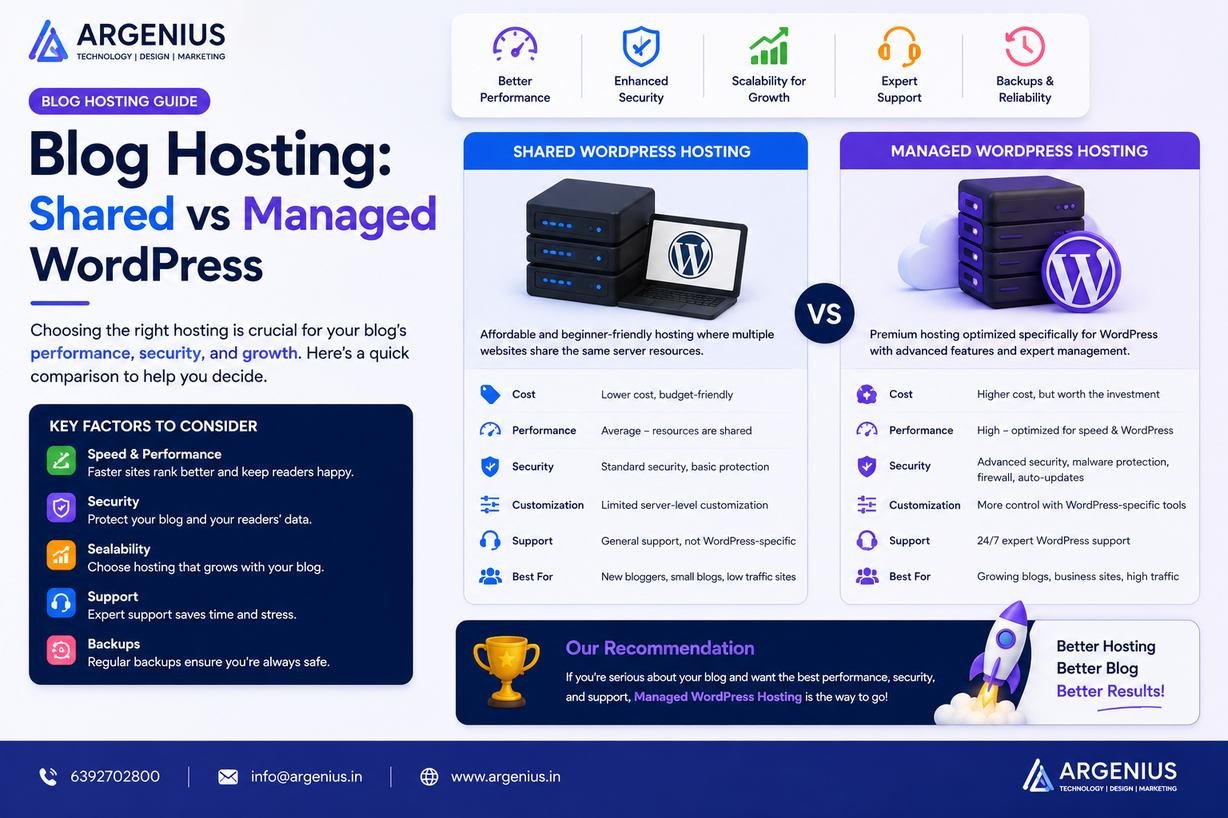
Shared Hosting is often recommended for beginners because it is affordable and easy to set up. Multiple websites share the same server resources, making it a cost-effective solution for small blogs with low traffic. However, as your website grows, shared hosting can become a limitation due to slower performance and limited server resources.
Managed WordPress Hosting, on the other hand, is specifically optimized for WordPress websites. It offers better speed, stronger security, automatic updates, daily backups, expert support, and performance optimization. Although it costs more than shared hosting, it provides a better experience for businesses and professional bloggers who want reliable performance and long-term scalability.
Choosing between these hosting options depends on your budget, expected traffic, technical expertise, and future growth plans. Understanding their differences helps you invest in a hosting solution that supports your blogging goals instead of limiting them.
In this comprehensive guide, we'll compare Shared Hosting and Managed WordPress Hosting across every important factor, including speed, SEO, security, pricing, maintenance, scalability, and overall value.
At Argenius, we build and optimize high-performance WordPress websites using hosting solutions that maximize speed, reliability, security, and long-term business growth.
What is Shared Hosting?
Shared Hosting is a hosting environment where multiple websites share the same server and its resources.
Typical features include:
- Low Cost
- Easy Setup
- Shared CPU & RAM
- Shared Storage
- Basic Control Panel
- Email Hosting
- One-Click WordPress Installation
- Free SSL (Most Providers)
- Beginner Friendly
- Basic Technical Support
It is a practical choice for small blogs and new website owners with limited budgets.
What is Managed WordPress Hosting?
Managed WordPress Hosting is a premium hosting service built specifically for WordPress websites.
Features typically include:
- Optimized WordPress Servers
- Automatic Updates
- Daily Backups
- Advanced Security
- Expert WordPress Support
- Built-in Caching
- Performance Optimization
- Malware Protection
- Staging Environment
- CDN Integration
Managed hosting reduces technical maintenance while improving website performance.
Shared Hosting vs Managed WordPress Hosting: Quick Comparison
| Feature |
Shared Hosting |
Managed WordPress Hosting |
| Price |
Low |
Medium to High |
| Performance |
Good |
Excellent |
| Speed |
Moderate |
Very Fast |
| Security |
Basic |
Advanced |
| Automatic Updates |
Limited |
Yes |
| Daily Backups |
Optional |
Usually Included |
| Expert WordPress Support |
Limited |
Yes |
| Server Optimization |
Basic |
WordPress Optimized |
| Scalability |
Moderate |
Excellent |
| SEO Performance |
Good |
Excellent |
Why Hosting Matters for Blogging
Your hosting affects almost every aspect of your blog.
Benefits of choosing quality hosting include:
- Faster Loading Pages
- Better User Experience
- Higher SEO Rankings
- Improved Security
- Greater Uptime
- Better Core Web Vitals
- Lower Bounce Rate
- Higher Conversion Rates
- Easier Website Management
- Long-Term Scalability
Reliable hosting creates a strong technical foundation for your blog.
Shared Hosting Advantages
Shared hosting is popular because it offers:
- Affordable Pricing
- Easy Website Setup
- Beginner-Friendly Dashboard
- Free SSL
- Email Accounts
- Domain Management
- One-Click Installations
- Low Maintenance
It is ideal for blogs with limited traffic and basic hosting requirements.
Managed WordPress Hosting Advantages
Managed WordPress Hosting provides:
- Faster Website Speed
- Automatic WordPress Updates
- Daily Website Backups
- Enhanced Security
- Expert Support
- Better Resource Allocation
- Built-in Performance Optimization
- Easy Scalability
- Developer Tools
- High Reliability
These features make it suitable for growing blogs and business websites.
Which Bloggers Should Choose Shared Hosting?
Shared hosting is a good option if:
- You're launching your first blog.
- Your budget is limited.
- Traffic is expected to be low initially.
- You don't require advanced performance.
- You're learning WordPress.
Which Bloggers Should Choose Managed WordPress Hosting?
Managed WordPress Hosting is ideal if:
- SEO is a priority.
- Your blog receives consistent traffic.
- Website speed is important.
- You run a business blog.
- You publish content regularly.
- You need expert support.
- You want minimal maintenance.
Common Hosting Mistakes
Avoid these mistakes:
- Choosing Hosting Based Only on Price
- Ignoring Renewal Costs
- No Backup Strategy
- Selecting Poor Customer Support
- Overlooking Website Security
- Ignoring Performance Features
- Choosing Inflexible Plans
- Delaying Upgrades
Making informed hosting decisions improves long-term website performance.
Detailed Performance Comparison
Performance is one of the biggest differences between Shared Hosting and Managed WordPress Hosting. Faster websites provide a better user experience, improve SEO, and increase conversions.
Shared Hosting
Performance depends on the number of websites sharing the same server.
Advantages:
- Good for Small Websites
- Affordable Performance
- Suitable for Low Traffic
- Basic Resource Allocation
Limitations:
- Slower During Peak Traffic
- Shared CPU & RAM
- Limited Optimization
- Resource Contention
Managed WordPress Hosting
Managed hosting is optimized specifically for WordPress.
Benefits include:
- Dedicated WordPress Optimization
- Built-in Caching
- CDN Integration
- PHP Optimization
- Faster Database Performance
- Better Resource Management
- Stable Performance During Traffic Spikes
- Optimized Server Configuration
For business websites and growing blogs, managed hosting delivers significantly better performance.
SEO & Speed Comparison
Website speed directly impacts search rankings and user engagement.
Shared Hosting
SEO Performance:
- Basic Speed
- Acceptable Core Web Vitals
- Suitable for Small Blogs
- Limited Server-Level Optimization
Managed WordPress Hosting
SEO Benefits:
- Faster Loading Pages
- Better Core Web Vitals
- Lower Bounce Rate
- Improved Crawl Efficiency
- Faster Image Delivery
- Optimized Database Queries
- Advanced Caching
- Better User Experience
For websites targeting competitive keywords, managed hosting provides a stronger technical SEO foundation.
Security Comparison
Website security protects your content, visitors, and business reputation.
Shared Hosting
Security features generally include:
- Free SSL
- Basic Firewall
- Malware Detection
- Manual Updates
- Basic Account Isolation
Since multiple websites share the same server, security risks can be higher if another account is compromised.
Managed WordPress Hosting
Advanced security features often include:
- Managed Firewall
- Malware Removal
- Daily Security Monitoring
- Automatic WordPress Updates
- Automatic Plugin Updates
- DDoS Protection
- Login Protection
- Regular Security Scanning
- Backup & Restore
- Advanced Server Hardening
These features reduce maintenance while improving overall security.
Scalability Comparison
As your blog grows, your hosting should grow with it.
Shared Hosting
Suitable for:
- Personal Blogs
- Beginner Websites
- Low Traffic
- Small Projects
Growth limitations:
- Limited Resources
- Slower Scaling
- Upgrade Required for Large Traffic
Managed WordPress Hosting
Ideal for:
- Business Blogs
- High-Traffic Websites
- Ecommerce Websites
- Membership Sites
- Agency Websites
- Growing Content Platforms
Scaling is typically smoother with fewer performance issues.
Customer Support Comparison
Shared Hosting
Support usually includes:
- General Hosting Support
- Email Support
- Ticket System
- Basic Live Chat
WordPress-specific troubleshooting may be limited.
Managed WordPress Hosting
Support typically offers:
- WordPress Experts
- Performance Assistance
- Security Guidance
- Plugin Compatibility Help
- Migration Support
- Optimization Recommendations
- Faster Response Times
This specialized support can save significant time for website owners.
Cost Comparison (₹ INR)
| Hosting Type |
Estimated Annual Cost |
| Shared Hosting |
₹2,000 – ₹6,000 / Year |
| Managed WordPress Hosting |
₹10,000 – ₹40,000 / Year |
| Premium Managed Hosting |
₹40,000 – ₹1,50,000+ / Year |
Factors Affecting Hosting Cost
Pricing depends on:
- Storage Space
- Monthly Traffic
- Server Resources
- Backup Features
- Security Tools
- CDN Integration
- Support Quality
- Hosting Provider
- Data Center Locations
- Premium Performance Features
Instead of choosing the cheapest plan, consider the long-term value it provides.
Best Hosting Providers
Popular hosting providers include:
Shared Hosting
- Hostinger
- Bluehost
- Namecheap
- A2 Hosting
- GreenGeeks
Managed WordPress Hosting
- Kinsta
- WP Engine
- Rocket.net
- Cloudways
- Pressable
Choose a provider based on uptime, support quality, security, performance, and scalability rather than price alone.
Best Practices
To get the best results from your hosting:
- Choose hosting based on your future traffic goals.
- Enable SSL from day one.
- Use a CDN for faster content delivery.
- Optimize images before uploading.
- Keep WordPress, themes, and plugins updated.
- Perform regular backups.
- Monitor uptime and website performance.
- Remove unused plugins and themes.
- Use strong passwords and two-factor authentication.
- Upgrade your hosting before performance becomes an issue.
Following these practices helps maintain a fast, secure, and reliable website.
Common Mistakes to Avoid
Avoid these hosting mistakes:
- Buying the cheapest plan without comparing features
- Ignoring renewal pricing
- Choosing hosting with poor customer support
- Not enabling backups
- Ignoring website security
- Installing too many plugins
- Delaying hosting upgrades
- Ignoring Core Web Vitals
- Not monitoring website uptime
- Assuming all hosting providers offer the same performance
Making informed decisions prevents future downtime and costly migrations.
Future Trends in Web Hosting
Hosting technology continues to evolve to meet the demands of modern websites.
Emerging trends include:
- AI-Powered Server Optimization
- Edge Computing
- Green Hosting Solutions
- Built-in CDN Services
- Automatic Performance Optimization
- Container-Based Infrastructure
- Enhanced Cybersecurity
- Cloud-Native Hosting
- Intelligent Scaling
- Improved Developer Tools
These innovations will continue to improve website speed, reliability, and security.
Why Businesses Choose Argenius
At Argenius, we don't just build WordPress websites—we ensure they're hosted on infrastructure designed for performance, security, and long-term growth.
Our services include:
- WordPress Website Development
- Hosting Consultation
- Website Migration
- Technical SEO
- Website Speed Optimization
- Performance Audits
- Security Hardening
- Cloud Hosting Setup
- Website Maintenance
- 24/7 Technical Support
We help businesses select the right hosting environment based on traffic expectations, business goals, and future scalability.
Final Thoughts
Choosing between Shared Hosting and Managed WordPress Hosting depends on your current needs and future plans. Shared hosting is an excellent starting point for beginners and small blogs because it is affordable and easy to manage. However, as your traffic grows and your website becomes more important to your business, its limitations in speed, security, and scalability become more noticeable.
For professional bloggers, businesses, and organizations that rely on their website for lead generation or revenue, Managed WordPress Hosting offers significant advantages. With optimized performance, stronger security, automatic maintenance, expert support, and better scalability, it provides a reliable foundation for long-term success. At Argenius, we help clients choose and configure hosting solutions that maximize website performance, improve SEO, and support sustainable digital growth.
Frequently Asked Questions
Which hosting is best for beginners?
Shared Hosting is ideal for beginners because it offers low costs, simple setup, and enough resources for new blogs.
Is Managed WordPress Hosting worth the extra cost?
Yes. If your website receives regular traffic or supports a business, the improved speed, security, support, and reliability often justify the higher investment.
Does hosting affect SEO?
Absolutely. Faster loading times, higher uptime, better security, and improved Core Web Vitals all contribute to stronger SEO performance.
When should I upgrade from Shared Hosting?
Consider upgrading when your website experiences increasing traffic, slower loading speeds, frequent resource limits, or requires enhanced security and performance.
Can I migrate from Shared Hosting to Managed WordPress Hosting?
Yes. Most hosting providers offer migration services, and professional developers can move your website with minimal downtime.
Does Argenius provide hosting setup and migration services?
Yes. Argenius offers hosting consultation, WordPress migration, website optimization, technical SEO, performance tuning, and ongoing maintenance to ensure your website performs at its best.