A secure blog protects your content, readers, and business reputation. Learn how to secure your WordPress website with SSL, backups, firewalls, malware protection, security plugins, and technical best practices.
Introduction
Creating valuable content takes time, effort, and consistency. However, without proper security measures, your entire blog can become vulnerable to hackers, malware, spam attacks, and data theft. A single security breach can damage your website's reputation, reduce search engine rankings, expose user information, and even result in complete data loss.
As websites become more popular, they also become attractive targets for cybercriminals. Automated bots constantly scan the internet looking for outdated software, weak passwords, vulnerable plugins, and unsecured websites. Even small blogs are not immune to these attacks.
Blog security is not just about protecting your website from hackers. It also safeguards your readers, improves trust, supports SEO, ensures website availability, and protects your business from financial losses. Search engines prefer secure websites, and visitors are more likely to trust a blog that uses HTTPS and follows modern security practices.
Fortunately, protecting your WordPress website doesn't require advanced technical knowledge. By implementing the right security plugins, performing regular backups, updating software, enabling SSL, and following best practices, you can significantly reduce security risks.
In this complete guide, you'll learn how to secure your blog, protect your content, defend against common cyber threats, and create a safe browsing experience for your visitors.
At Argenius, we build secure WordPress websites using industry best practices, advanced security tools, technical SEO, and ongoing maintenance to keep businesses protected from evolving online threats.
What is Blog Security?
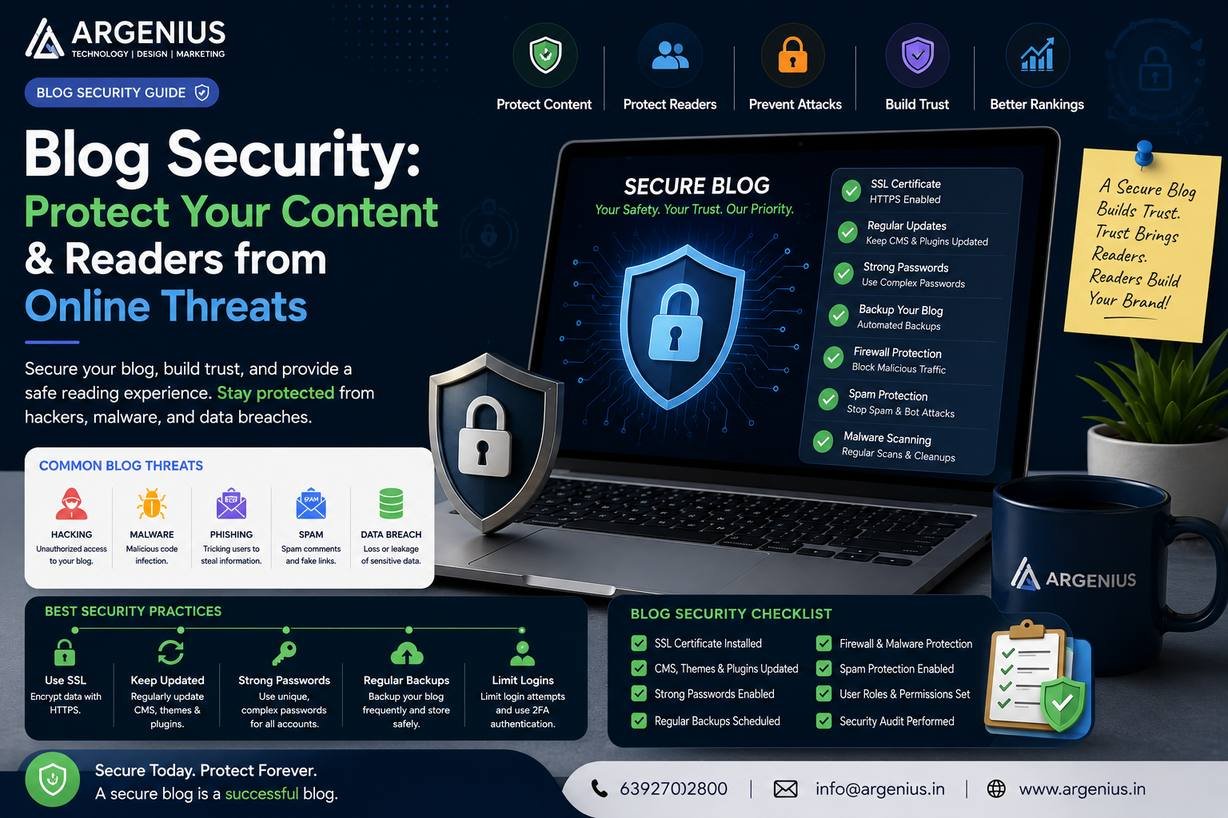
Blog security is the process of protecting your website, content, user data, and server from unauthorized access, cyberattacks, malware, spam, and data loss.
It includes:
- SSL Encryption
- Firewall Protection
- Malware Scanning
- Website Backups
- Login Security
- Plugin Security
- Theme Security
- Database Protection
- File Monitoring
- User Access Management
A secure website protects both your business and your visitors.
Why Blog Security Matters
Investing in website security provides several important benefits.
It helps you:
- Protect Website Data
- Improve User Trust
- Strengthen SEO
- Prevent Malware Infections
- Reduce Downtime
- Prevent Data Loss
- Protect Customer Information
- Improve Website Performance
- Avoid Blacklisting
- Support Long-Term Business Growth
A secure website builds credibility and improves the overall user experience.
Common Security Threats
Understanding potential risks helps you prepare effective defenses.
The most common threats include:
Malware
Malicious software that can steal data, damage files, or redirect visitors to harmful websites.
Brute Force Attacks
Automated bots repeatedly try different username and password combinations to gain access to your WordPress dashboard.
SQL Injection
Attackers attempt to exploit database vulnerabilities by injecting malicious code into forms or URLs.
Cross-Site Scripting (XSS)
Hackers inject harmful scripts that execute in users' browsers and can steal cookies or session information.
Spam Attacks
Spam bots flood your comment section or contact forms with unwanted messages and malicious links.
DDoS Attacks
Distributed Denial-of-Service attacks overwhelm your server with fake traffic, making your website unavailable to real visitors.
Essential Website Security Measures
Every professional blog should implement these security features:
- SSL Certificate
- Strong Password Policy
- Two-Factor Authentication (2FA)
- Firewall Protection
- Malware Scanner
- Daily Backups
- Login Attempt Limiting
- Automatic Updates
- Secure Hosting
- File Integrity Monitoring
Together, these measures create multiple layers of protection.
SSL Certificate and HTTPS
An SSL Certificate encrypts the communication between your website and its visitors.
Benefits include:
- Secure Data Transfer
- Better User Trust
- Improved SEO
- Browser Security Indicators
- Protection Against Data Interception
HTTPS is now considered a standard requirement for every professional website.
Importance of Regular Backups
Backups ensure that your website can be restored quickly if something goes wrong.
A good backup strategy includes:
- Daily Automatic Backups
- Cloud Storage
- One-Click Restore
- Database Backup
- File Backup
- Scheduled Backup Verification
Regular backups minimize downtime and prevent permanent data loss.
Common Blog Security Mistakes
Avoid these common mistakes:
- Using Weak Passwords
- Ignoring WordPress Updates
- Installing Plugins from Untrusted Sources
- Skipping Website Backups
- Using Outdated Themes
- Giving Admin Access to Too Many Users
- Not Using SSL
- Ignoring Security Warnings
- Leaving Default Login URLs Unchanged
- Not Monitoring Website Activity
Preventing these mistakes significantly improves your website's security.
Best WordPress Security Plugins
The right security plugins can help protect your website from hackers, malware, spam, and unauthorized access. Instead of installing multiple security tools that perform the same function, choose one reliable plugin and configure it properly.
Wordfence Security
Features:
- Website Firewall
- Malware Scanner
- Login Protection
- Live Traffic Monitoring
- Brute Force Protection
- File Integrity Monitoring
Solid Security
Features:
- Two-Factor Authentication
- Login Security
- Malware Detection
- User Activity Logs
- Password Policies
- Scheduled Security Checks
Sucuri Security
Features:
- Website Firewall
- Malware Removal
- Security Monitoring
- Blacklist Monitoring
- File Integrity Checks
- Incident Response
Akismet Anti-Spam
Features:
- Spam Comment Protection
- Contact Form Spam Filtering
- Automatic Spam Detection
UpdraftPlus
Features:
- Automatic Backups
- Cloud Storage Integration
- One-Click Restore
- Scheduled Backups
Although it's primarily a backup plugin, it plays a crucial role in your overall website security strategy.
Blog Security Checklist
Use this checklist to strengthen your website's protection before launching and during regular maintenance.
- Install SSL Certificate
- Enable HTTPS
- Use Strong Passwords
- Enable Two-Factor Authentication
- Update WordPress Regularly
- Update Themes
- Update Plugins
- Install Security Plugin
- Configure Firewall
- Enable Malware Scanning
- Schedule Automatic Backups
- Limit Login Attempts
- Remove Unused Plugins
- Delete Inactive Themes
- Secure Admin Account
- Monitor User Activity
- Disable File Editing
- Optimize Database Security
- Monitor Website Uptime
- Test Backup Restoration
Following this checklist reduces the likelihood of security incidents and helps keep your website reliable.
Backup Strategy
Backups are your safety net if your website is compromised or data is accidentally deleted.
A strong backup plan should include:
Daily Backups
Back up both website files and the database every day.
Cloud Storage
Store backups in secure locations such as cloud storage rather than only on your hosting server.
Multiple Backup Copies
Maintain several backup versions so you can restore an earlier copy if needed.
Automated Backup Schedule
Schedule backups to run automatically without manual intervention.
Test Backup Restoration
Regularly verify that your backups can actually be restored successfully.
A backup is only useful if it works when you need it.
Advanced Security Tips
Take your website protection further with these advanced practices.
- Change Default Admin Username
- Disable XML-RPC if Not Needed
- Restrict File Permissions
- Disable Directory Listing
- Use Secure Web Hosting
- Enable Web Application Firewall (WAF)
- Monitor Server Logs
- Enable Security Headers
- Protect wp-config.php
- Disable Unused User Accounts
- Restrict Admin Access by IP (where appropriate)
- Monitor Failed Login Attempts
These additional measures provide stronger protection against sophisticated attacks.
Website Monitoring
Continuous monitoring helps detect security issues before they become major problems.
Monitor:
- Website Uptime
- Malware Alerts
- Login Activity
- File Changes
- Server Performance
- SSL Certificate Status
- Blacklist Status
- Plugin Updates
Early detection minimizes downtime and potential damage.
Security Cost (₹ INR)
| Service |
Estimated Cost |
| SSL Certificate |
₹0 – ₹8,000 / Year |
| Premium Security Plugin |
₹4,000 – ₹15,000 / Year |
| Automatic Backup Solution |
₹0 – ₹8,000 / Year |
| Website Firewall |
₹6,000 – ₹25,000 / Year |
| Professional Website Security Audit |
₹10,000 – ₹50,000 |
| Complete Website Security Package |
₹20,000 – ₹1,00,000+ |
Factors Affecting Security Costs
The overall investment depends on:
- Website Size
- Number of Users
- Hosting Environment
- Security Requirements
- Compliance Standards
- Premium Tools
- Monitoring Services
- Ongoing Maintenance
Investing in preventive security is often far less expensive than recovering from a successful cyberattack.
Best Practices
Follow these best practices to keep your blog secure:
- Keep WordPress updated.
- Update themes and plugins regularly.
- Install plugins only from trusted developers.
- Enable Two-Factor Authentication.
- Use strong, unique passwords.
- Schedule automatic backups.
- Scan your website for malware frequently.
- Remove unused plugins and themes.
- Monitor user activity and login attempts.
- Perform regular security audits.
Consistent maintenance is one of the most effective ways to reduce security risks.
Common Mistakes to Avoid
Avoid these common security mistakes:
- Reusing weak passwords
- Ignoring software updates
- Installing pirated themes or plugins
- Not enabling HTTPS
- Giving unnecessary administrator access
- Skipping regular backups
- Ignoring malware warnings
- Using outdated PHP versions
- Leaving unused plugins installed
- Failing to test backup restoration
Correcting these mistakes greatly improves your website's resilience.
Future Trends in Blog Security
Website security continues to evolve as cyber threats become more advanced.
Emerging trends include:
- AI-Powered Threat Detection
- Zero Trust Security Models
- Passwordless Authentication
- Advanced Bot Protection
- Behavioral Analytics
- Cloud-Based Security Services
- Automated Vulnerability Scanning
- Real-Time Threat Intelligence
- Enhanced Privacy Controls
- Smarter Web Application Firewalls
Keeping up with these trends helps maintain long-term website security.
Why Businesses Choose Argenius
At Argenius, we build secure WordPress websites that prioritize performance, reliability, and long-term protection.
Our services include:
- WordPress Website Development
- Website Security Hardening
- Technical SEO
- Malware Protection
- SSL & HTTPS Configuration
- Website Backup Solutions
- Performance Optimization
- Security Audits
- Website Maintenance
- Digital Marketing Services
We combine modern security practices with technical expertise to help businesses protect their websites, customers, and online reputation.
Final Thoughts
A secure blog is the foundation of a trustworthy online presence. Whether you run a personal blog, business website, or eCommerce store, protecting your content, visitor data, and website infrastructure should always be a top priority. By implementing SSL, enabling strong authentication, keeping WordPress updated, performing regular backups, and monitoring your website for suspicious activity, you can significantly reduce security risks.
Website security is not a one-time setup—it requires continuous attention and proactive maintenance. Regular updates, security audits, and monitoring ensure that your blog remains protected as new threats emerge. At Argenius, we help businesses build and maintain secure WordPress websites that combine strong protection, excellent performance, and technical SEO for sustainable online growth.
Frequently Asked Questions
Why is blog security important?
Blog security protects your website, content, customer data, and business reputation from hackers, malware, spam, and other cyber threats while improving visitor trust.
Does website security affect SEO?
Yes. Secure websites using HTTPS and following modern security practices are trusted more by users and search engines. Security issues such as malware infections can negatively impact search rankings.
How often should I back up my website?
For most websites, daily automatic backups are recommended. High-traffic or frequently updated websites may benefit from more frequent backups.
Which security plugin is best for WordPress?
Popular options include Wordfence Security, Solid Security, and Sucuri Security. The right choice depends on your website's size, features, and security requirements.
What is the purpose of an SSL certificate?
An SSL certificate encrypts data exchanged between your website and visitors, improving security, user trust, and search engine visibility.
Does Argenius provide website security services?
Yes. Argenius offers WordPress security hardening, SSL configuration, malware protection, website backups, technical SEO, security audits, and ongoing maintenance to help businesses keep their websites safe and reliable.