Choosing the right blog theme is essential for creating a fast, professional, and user-friendly website. Learn how to select an SEO-friendly, mobile-responsive, and high-performing blog theme that supports long-term growth and improves user experience.
Introduction
Your blog's design is often the first thing visitors notice. Within a few seconds, users decide whether your website looks trustworthy, professional, and easy to navigate. A well-designed blog theme not only creates a strong first impression but also improves user experience, website speed, and search engine rankings.
Many beginners choose a theme based only on appearance. While visual appeal is important, factors such as performance, SEO, mobile responsiveness, accessibility, and customization play an even bigger role in the long-term success of a blog. A beautiful theme that loads slowly or lacks essential features can increase bounce rates and negatively affect your organic traffic.
The right blog theme should align with your brand identity while providing a smooth browsing experience across all devices. It should be lightweight, secure, regularly updated, and compatible with the plugins you plan to use. Whether you're building a personal blog, business website, portfolio, or content platform, your theme becomes the foundation of your online presence.
A thoughtfully selected theme also makes website management easier. From customizing layouts and typography to optimizing images and integrating SEO tools, the right design can save time while improving website performance and scalability.
In this comprehensive guide, you'll learn how to choose the best blog theme, understand the key features to look for, compare free and premium themes, avoid common mistakes, and create a professional blog that delivers an excellent user experience.
At Argenius, we build fast, SEO-friendly, and visually appealing WordPress websites using carefully selected themes that support branding, performance, and long-term business growth.
What is a Blog Theme?
A blog theme is a collection of templates, styles, layouts, and design settings that control the appearance and structure of your website.
It determines how your blog looks and functions, including:
- Homepage Layout
- Blog Post Design
- Typography
- Colors
- Navigation
- Sidebar Placement
- Header & Footer
- Widgets
- Mobile Layout
- Overall User Experience
A quality theme combines attractive design with strong performance and usability.
Why Choosing the Right Theme Matters
The right theme offers several benefits:
- Better User Experience
- Faster Website Speed
- Improved SEO
- Mobile-Friendly Design
- Professional Branding
- Higher Engagement
- Lower Bounce Rate
- Better Accessibility
- Easier Navigation
- Increased Conversion Opportunities
A well-optimized theme creates a positive experience for both users and search engines.
Types of Blog Themes
Minimal Themes
Ideal for:
- Personal Blogs
- Writers
- News Websites
- Content-Focused Blogs
Business Themes
Suitable for:
- Agencies
- Startups
- Corporate Websites
- Service Businesses
Magazine Themes
Perfect for:
- News Portals
- Technology Blogs
- Entertainment Websites
- Multi-Category Blogs
Portfolio Themes
Best for:
- Designers
- Photographers
- Freelancers
- Creative Professionals
Ecommerce Themes
Designed for:
- Online Stores
- Product Blogs
- Affiliate Websites
- WooCommerce Websites
Essential Features of a Good Blog Theme
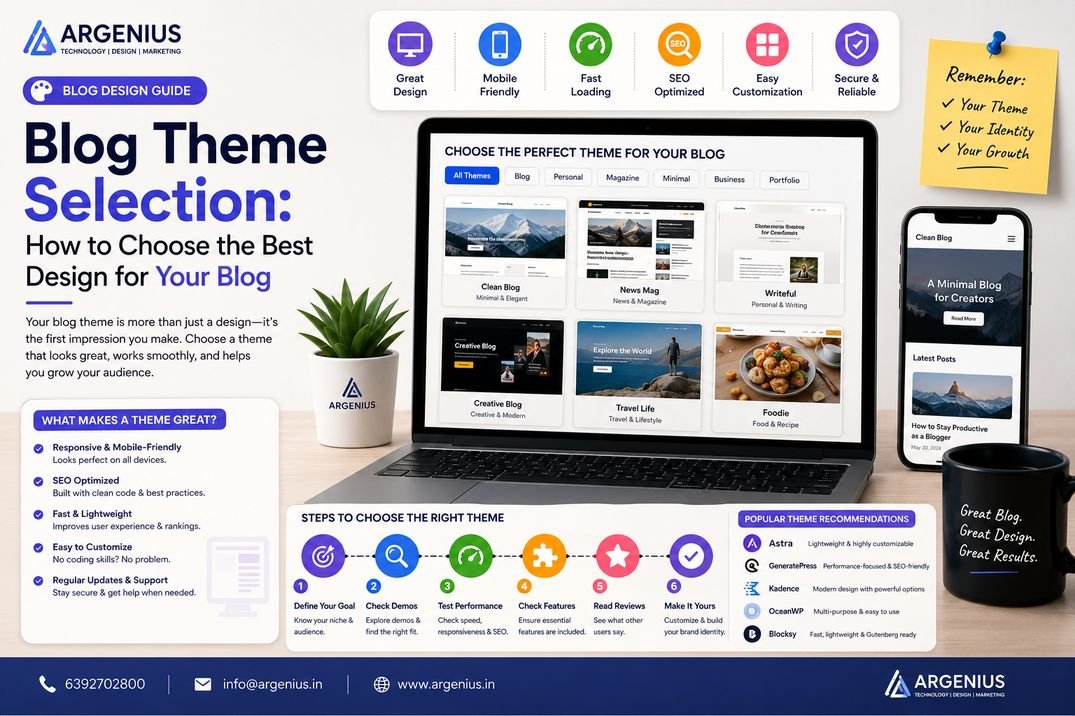
When selecting a theme, look for:
- Mobile Responsiveness
- Fast Loading Speed
- SEO-Friendly Code
- Clean Navigation
- Accessibility Support
- Regular Updates
- Security Standards
- Browser Compatibility
- Easy Customization
- Plugin Compatibility
These features ensure your website performs well and provides a seamless user experience.
Free vs Premium Themes
Free Themes
Advantages:
- No Cost
- Easy to Install
- Good for Beginners
Limitations:
- Limited Features
- Basic Customization
- Slower Support
Premium Themes
Advantages:
- Advanced Features
- Better Performance
- Professional Design
- Regular Updates
- Dedicated Support
- Greater Customization
Premium themes are often the better choice for businesses and professional bloggers.
Common Theme Selection Mistakes
Avoid these mistakes:
- Choosing a Theme Based Only on Appearance
- Ignoring Website Speed
- Selecting Bloated Themes
- Overlooking Mobile Responsiveness
- Ignoring SEO Compatibility
- Using Outdated Themes
- Installing Too Many Theme Features
- Choosing Unsupported Themes
Making the right choice early helps prevent redesigns and performance issues later.
Theme Selection Checklist
Before installing a theme, make sure it meets the following criteria:
- Mobile Responsive
- Fast Loading Speed
- SEO-Friendly Structure
- Regular Updates
- Clean Code
- Compatible with Popular Plugins
- Accessibility Support
- Browser Compatibility
- Secure Coding Standards
- Good User Reviews
- Active Developer Support
- Easy Customization Options
Checking these points helps you avoid performance and compatibility issues later.
SEO & Speed Comparison
Your blog theme has a direct impact on SEO, page speed, and user experience.
Lightweight Themes
Advantages:
- Faster Loading Speed
- Better Core Web Vitals
- Improved User Experience
- Better Mobile Performance
- Higher SEO Potential
Ideal for:
- Business Websites
- Blogs
- Portfolio Websites
- Service Websites
Heavy Multi-Purpose Themes
Advantages:
- Many Design Options
- Ready-Made Templates
- Built-in Features
Disadvantages:
- Slower Loading Speed
- Larger CSS & JavaScript Files
- Higher Server Load
- Lower Core Web Vitals
- More Maintenance
Unless you genuinely need all the extra features, a lightweight theme is usually the better choice.
Theme Customization Tips
A professional-looking blog doesn't require complicated customization.
Focus on:
Brand Colors
Use consistent colors throughout your website.
Typography
Choose readable fonts.
Recommended:
- Inter
- Poppins
- Roboto
- Open Sans
- Lato
Header Design
Include:
- Logo
- Navigation Menu
- Search
- Call-to-Action Button
Homepage Layout
Organize sections clearly:
- Hero Section
- Featured Posts
- Categories
- Recent Articles
- Newsletter
- Testimonials
- Footer
Images
Use:
- High Quality Images
- Optimized File Sizes
- Consistent Style
- Proper Alt Text
Free vs Premium Theme Comparison
| Feature |
Free Theme |
Premium Theme |
| Price |
Free |
Paid |
| Support |
Limited |
Dedicated |
| Updates |
Limited |
Regular |
| Customization |
Basic |
Advanced |
| Performance |
Good |
Excellent |
| SEO |
Good |
Excellent |
| Templates |
Limited |
Extensive |
| Security |
Good |
Better |
| Documentation |
Basic |
Comprehensive |
Premium themes generally provide more flexibility, better optimization, and long-term support.
Best WordPress Themes
Some of the most reliable and popular themes include:
Astra
Best For:
- Business Websites
- Blogs
- Agencies
GeneratePress
Best For:
- Speed
- SEO
- Lightweight Websites
Kadence
Best For:
- Beginners
- Professional Blogs
- Business Websites
Blocksy
Best For:
- Modern Design
- WooCommerce
- Creative Websites
OceanWP
Best For:
- Ecommerce
- Portfolio
- Business Sites
Hello Theme
Best For:
- Elementor Users
- Custom Designs
Choose a theme that matches your goals rather than simply following trends.
Cost of Premium Themes (₹ INR)
| Item |
Estimated Cost |
| Free Theme |
₹0 |
| Premium WordPress Theme |
₹3,000 – ₹8,000 |
| Lifetime Theme License |
₹10,000 – ₹25,000 |
| Custom WordPress Theme Development |
₹30,000 – ₹2,00,000+ |
Factors Affecting Theme Cost
The total cost depends on:
- Theme Features
- Developer Reputation
- Support Duration
- Update Frequency
- Number of Website Licenses
- Customization Requirements
- Built-in Integrations
Selecting the right theme should be based on value and performance rather than price alone.
Best Practices
Follow these best practices when selecting a blog theme:
- Choose a lightweight theme.
- Prioritize SEO-friendly coding.
- Test mobile responsiveness.
- Check loading speed before installation.
- Install themes only from trusted sources.
- Keep your theme updated.
- Avoid unnecessary animations.
- Use only essential plugins.
- Maintain consistent branding.
- Test your website across multiple devices and browsers.
These practices improve usability, search performance, and long-term maintainability.
Common Mistakes to Avoid
Avoid these common theme selection mistakes:
- Choosing a theme based only on appearance
- Ignoring loading speed
- Installing outdated themes
- Selecting unsupported themes
- Using too many page builders
- Over-customizing the design
- Ignoring accessibility
- Forgetting plugin compatibility
- Choosing themes with poor reviews
- Not testing before launching
Avoiding these mistakes results in a more stable and professional website.
Future Trends in Blog Themes
Modern WordPress themes continue to evolve with new technologies.
Emerging trends include:
- AI-Assisted Website Design
- Block-Based Full Site Editing
- Headless WordPress Integration
- Minimalist User Interfaces
- Dark Mode Support
- Accessibility-First Design
- Faster Core Web Vitals Optimization
- Built-in Performance Features
- Dynamic Personalization
- Lightweight, Modular Themes
These trends focus on delivering faster, more accessible, and user-friendly websites.
Why Businesses Choose Argenius
At Argenius, we help businesses build high-performing WordPress websites using carefully selected themes that balance design, speed, SEO, and scalability.
Our services include:
- WordPress Website Development
- Custom Theme Development
- Theme Selection Consultation
- Website Redesign
- Technical SEO
- Website Speed Optimization
- UI/UX Design
- Performance Audits
- Website Maintenance
- Digital Marketing Services
Our goal is to create websites that not only look professional but also deliver measurable business results.
Final Thoughts
Your blog theme is much more than a visual template—it's the foundation of your website's user experience, performance, and online success. A well-chosen theme improves loading speed, strengthens SEO, enhances mobile usability, and reinforces your brand identity. While attractive design matters, it should never come at the cost of performance or usability.
Before selecting a theme, evaluate its speed, responsiveness, code quality, update history, and compatibility with the tools you plan to use. Investing in a lightweight, well-supported theme can save countless hours of troubleshooting and future redesigns. At Argenius, we help businesses choose and customize WordPress themes that combine exceptional design with technical excellence, creating websites built for long-term growth.
Frequently Asked Questions
How do I choose the best blog theme?
Choose a theme that is responsive, fast, SEO-friendly, regularly updated, easy to customize, and compatible with the plugins your website requires.
Are premium WordPress themes worth buying?
Yes. Premium themes generally offer better performance, more customization options, regular updates, professional support, and enhanced security compared to most free themes.
Does a blog theme affect SEO?
Yes. A clean, lightweight, and well-coded theme can improve page speed, Core Web Vitals, mobile usability, and overall SEO performance.
Can I change my blog theme later?
Yes, but changing themes may affect layouts, widgets, and custom settings. Testing the new theme on a staging site before going live is recommended.
Which type of theme is best for business blogs?
Lightweight themes such as Astra, GeneratePress, Kadence, or Blocksy are excellent choices because they combine speed, flexibility, and strong SEO capabilities.
Does Argenius help with WordPress theme selection?
Yes. Argenius provides theme consultation, custom theme development, WordPress website design, technical SEO, performance optimization, and ongoing maintenance to help businesses build fast and professional websites.