Learn how Google Shopping Ads help ecommerce businesses showcase products directly in Google Search with images, prices, reviews, and promotions. Discover setup, optimization strategies, costs, and best practices to increase clicks, improve CTR, and boost online sales.
Introduction
Every ecommerce business wants one thing—more sales. But with increasing competition and thousands of online stores fighting for customer attention, simply running traditional search ads is no longer enough. Shoppers want to see product images, prices, ratings, discounts, and shipping information before they even click on a website. That's exactly where Google Shopping Ads make a difference.
Unlike standard text ads, Google Shopping Ads display your product image, title, price, store name, customer ratings, and promotional offers directly in Google Search. This visual format attracts highly interested buyers who are already searching for products similar to yours, leading to better click-through rates (CTR), higher purchase intent, and improved conversion rates.
For ecommerce brands, Shopping Ads have become one of the most profitable digital marketing channels. Whether you're selling electronics, fashion, furniture, beauty products, home décor, books, or industrial equipment, Shopping Ads help place your products in front of customers at the exact moment they're ready to buy.
A successful Shopping campaign isn't just about uploading products into Google Merchant Center. It requires accurate product feeds, compelling product titles, optimized images, competitive pricing, smart bidding strategies, audience targeting, and continuous performance optimization. When all these elements work together, businesses can significantly improve visibility while reducing advertising costs.
With Google's growing use of AI through Performance Max, automated bidding, and intelligent audience targeting, Shopping campaigns have become even more powerful. Businesses that optimize their product feeds and campaign structure consistently achieve higher CTRs, better Quality Scores, lower CPCs, and stronger return on ad spend (ROAS).
In this complete guide, you'll learn how Google Shopping Ads work, how to create successful ecommerce campaigns, optimize product listings, improve CTR, reduce advertising costs, and maximize online sales.
At Argenius, we help ecommerce businesses build data-driven Shopping campaigns that increase product visibility, improve click-through rates, and generate profitable online sales.
What are Google Shopping Ads?
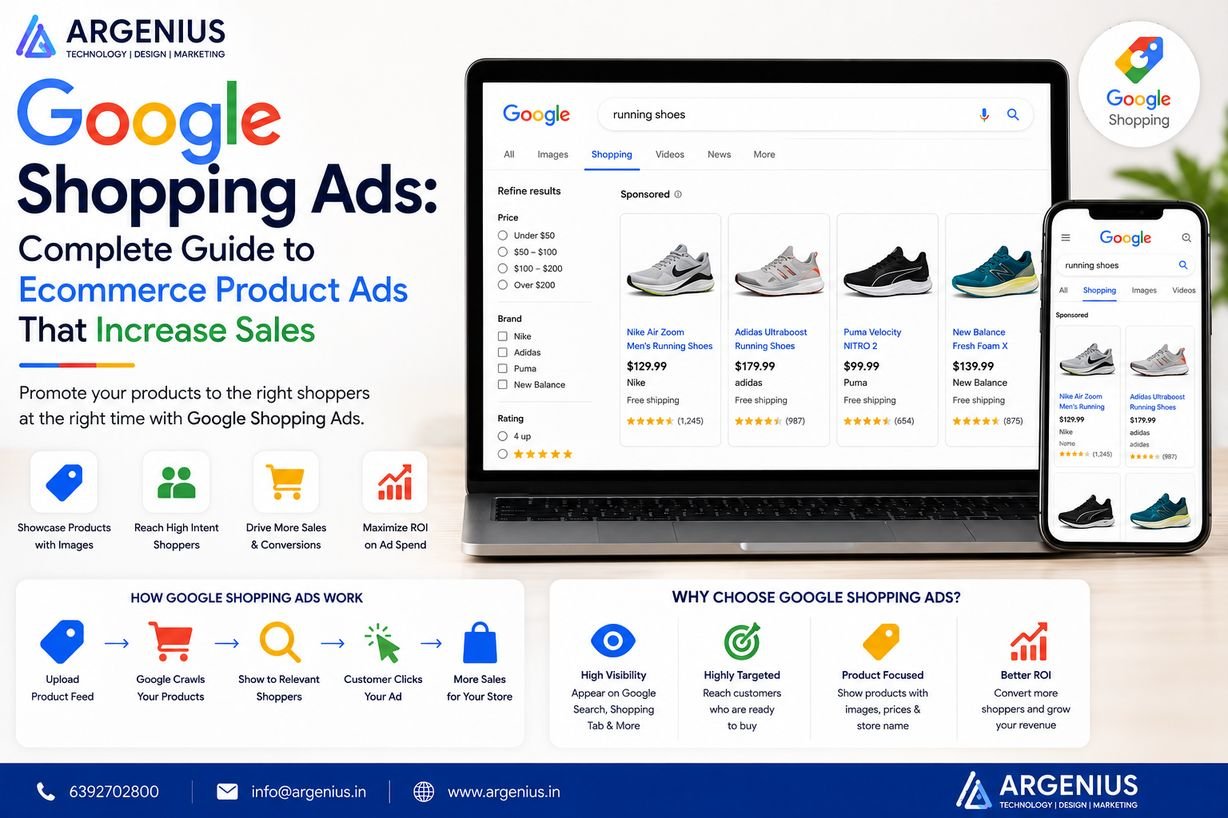
Google Shopping Ads, also known as Product Listing Ads (PLAs), are visual advertisements that display products directly within Google Search results.
Instead of showing only text, Shopping Ads include:
- Product Image
- Product Title
- Price
- Store Name
- Customer Rating
- Shipping Information
- Promotional Offers
- Product Availability
This rich information helps customers make faster purchasing decisions while improving ad engagement.
Why Google Shopping Ads are Important
Shopping campaigns offer several advantages over traditional search advertising.
They help businesses:
- Increase Product Visibility
- Improve Click-Through Rate (CTR)
- Generate Qualified Traffic
- Boost Ecommerce Sales
- Reduce Customer Acquisition Cost
- Showcase Product Images
- Display Competitive Pricing
- Improve Conversion Rates
- Reach High-Intent Buyers
- Maximize Return on Ad Spend (ROAS)
Because shoppers can view key product details before clicking, the traffic generated is often more qualified and likely to convert.
How Google Shopping Ads Work
Google Shopping Ads rely on a product feed submitted through Google Merchant Center.
The process includes:
- Create a Google Merchant Center account.
- Upload your product catalog.
- Verify and claim your website.
- Connect Merchant Center with Google Ads.
- Create a Shopping or Performance Max campaign.
- Optimize bidding, budget, and targeting.
- Continuously monitor performance and improve product feeds.
Google uses the information from your product feed to determine when and where your ads appear.
Types of Google Shopping Campaigns
Standard Shopping Campaigns
Provide greater control over bids, priorities, and product segmentation.
Best for:
- Experienced advertisers
- Manual optimization
- Feed testing
- Budget control
Performance Max Shopping Campaigns
AI-powered campaigns that automatically display products across:
- Google Search
- Shopping Tab
- YouTube
- Gmail
- Discover
- Display Network
- Google Maps
Performance Max uses machine learning to maximize conversions and revenue.
Google Shopping Ads vs Search Ads
| Google Shopping Ads |
Search Ads |
| Product Images |
Text Only |
| Product Price Display |
No Price |
| Merchant Name |
Headline Only |
| Product Feed Based |
Keyword Based |
| Higher Buying Intent |
General Search Intent |
| Better Ecommerce CTR |
Standard CTR |
Shopping Ads are especially effective for ecommerce businesses because they visually showcase products before users click.
Benefits of Google Shopping Ads
Businesses invest in Shopping Ads because they provide:
- Higher CTR
- Better Qualified Traffic
- Increased Online Sales
- Visual Product Listings
- Better Product Discovery
- Smart Audience Targeting
- AI-Powered Optimization
- Improved ROAS
- Automated Campaign Management
- Scalable Ecommerce Growth
Key Components of Successful Shopping Campaigns
High-performing Shopping campaigns include:
- Optimized Product Titles
- High-Quality Images
- Accurate Product Descriptions
- Correct Product Categories
- GTIN & Brand Information
- Competitive Pricing
- Optimized Product Feed
- Customer Reviews
- Merchant Promotions
- Conversion Tracking
Each component contributes to improved ad relevance and higher click-through rates.
Product Feed Optimization
Your product feed is the foundation of every successful Google Shopping Ads campaign. Google uses feed data—not keywords—to determine when your products appear in search results. A well-optimized feed improves visibility, increases relevance, boosts CTR, and lowers advertising costs.
Optimize Product Titles
Include the most important information at the beginning of the title.
A strong title should contain:
- Brand Name
- Product Name
- Model
- Color
- Size
- Material
- Important Features
Example:
Nike Air Max 270 Men's Running Shoes Black Size 10
Avoid keyword stuffing or unnecessary promotional text.
Write Detailed Product Descriptions
Product descriptions should clearly explain:
- Features
- Benefits
- Specifications
- Material
- Compatibility
- Usage
- Warranty
Write unique descriptions for every product to improve relevance.
Use High-Quality Product Images
Images have a major impact on CTR.
Best practices:
- High Resolution
- White Background
- No Watermarks
- Multiple Product Angles
- Proper Lighting
- Accurate Colors
- Clear Product Visibility
High-quality visuals attract more clicks and build buyer confidence.
Select the Correct Product Category
Always use Google's recommended product taxonomy.
Correct categorization helps Google understand your products and improves ad relevance.
Keep Pricing Accurate
Your product feed should always match your website.
Maintain consistency for:
- Product Price
- Discount Price
- Availability
- Shipping Charges
- Tax Information
Mismatched data may lead to product disapproval.
How to Improve Shopping Ads CTR
Increasing Click-Through Rate (CTR) is one of the most effective ways to improve campaign performance and reduce advertising costs.
Use Compelling Product Titles
Focus on:
- Brand
- Product Type
- Key Features
- Size
- Color
- Model
Titles should match how customers search on Google.
Upload Professional Product Images
Professional images naturally attract more attention than low-quality product photos.
Use:
- Clean Backgrounds
- Sharp Images
- Multiple Angles
- Lifestyle Images (where applicable)
Display Competitive Pricing
Customers compare prices before clicking.
Offer:
- Competitive Pricing
- Seasonal Discounts
- Coupon Offers
- Bundle Deals
- Free Shipping
Pricing incentives can significantly improve CTR.
Collect Product Reviews
Products with positive ratings generally receive more clicks.
Encourage verified customers to leave reviews after purchase.
Enable Merchant Promotions
Highlight offers such as:
- Free Shipping
- Buy One Get One
- Cashback
- Festival Discounts
- Limited-Time Deals
Promotions help your listings stand out.
Optimize Product Feed Regularly
Review and update your product feed frequently to improve:
- Titles
- Descriptions
- Images
- Pricing
- Categories
- Availability
Fresh and accurate data supports better campaign performance.
Google Merchant Center Best Practices
To maintain a healthy Merchant Center account:
- Verify Your Website
- Claim Your Domain
- Update Product Feed Daily
- Fix Feed Errors Promptly
- Monitor Product Diagnostics
- Add Accurate Shipping Information
- Configure Tax Settings
- Use High-Quality Images
- Submit Structured Data
- Keep Inventory Updated
These practices reduce product disapprovals and improve ad eligibility.
Performance Max Optimization Tips
Performance Max campaigns rely heavily on AI, but strategic optimization remains essential.
Recommended practices:
- Upload High-Quality Creative Assets
- Use Audience Signals
- Optimize Product Feed
- Monitor Asset Group Performance
- Track Conversion Value
- Exclude Low-Performing Products
- Improve Landing Page Experience
- Test Promotional Offers
Human oversight combined with AI automation produces the best results.
Best Tools for Google Shopping Ads
Free Tools
- Google Merchant Center
- Google Ads
- Google Analytics 4
- Google Tag Manager
- Google Search Console
- Google Trends
Premium Tools
- Semrush
- Ahrefs
- DataFeedWatch
- Channable
- Optmyzr
- Feedonomics
- Hotjar
- Microsoft Clarity
These tools simplify feed management, competitor analysis, conversion tracking, and campaign optimization.
Cost of Google Shopping Ads Management (₹ INR)
| Service |
Estimated Cost |
| Merchant Center Setup |
₹8,000 – ₹20,000 |
| Product Feed Creation |
₹10,000 – ₹30,000 |
| Shopping Campaign Setup |
₹12,000 – ₹30,000 |
| Monthly Shopping Ads Management |
₹20,000 – ₹1,20,000 |
| Enterprise Ecommerce PPC Management |
Custom Pricing |
Factors Affecting Cost
Campaign pricing depends on:
- Number of Products
- Industry Competition
- Monthly Advertising Budget
- Feed Quality
- Campaign Complexity
- Geographic Targeting
- Product Categories
- Reporting Requirements
A professionally managed campaign improves CTR, lowers CPC, and maximizes ROAS.
Best Practices
To maximize Shopping campaign performance:
- Optimize every product title.
- Use high-resolution product images.
- Keep pricing updated.
- Maintain accurate product availability.
- Improve product feed quality.
- Add GTIN and brand information.
- Enable product reviews.
- Monitor search term reports.
- Track conversions accurately.
- Optimize campaigns every week.
Consistent optimization leads to stronger CTR and better profitability.
Common Mistakes to Avoid
Avoid these common Shopping Ads mistakes:
- Poor product titles
- Low-quality images
- Incorrect product categories
- Missing GTINs
- Outdated pricing
- Incomplete product descriptions
- Ignoring Merchant Center warnings
- Weak landing pages
- No conversion tracking
- Rarely updating the product feed
Correcting these issues improves campaign performance and reduces wasted ad spend.
Future Trends in Google Shopping Ads
Ecommerce advertising is rapidly evolving through AI and automation.
Key trends include:
- AI-Powered Performance Max Campaigns
- Predictive Smart Bidding
- Visual Search Integration
- Voice Commerce
- Personalized Product Recommendations
- First-Party Data Strategies
- AI Product Feed Optimization
- Cross-Channel Ecommerce Advertising
- Automated Creative Generation
- Privacy-Focused Advertising
Businesses adopting these innovations early will gain a stronger competitive advantage.
Why Businesses Choose Argenius
At Argenius, we help ecommerce businesses build profitable Google Shopping Ads campaigns that increase product visibility, improve CTR, and maximize online sales.
Our ecommerce advertising services include:
- Google Merchant Center Setup
- Shopping Campaign Management
- Performance Max Campaigns
- Product Feed Optimization
- Product Title Optimization
- Conversion Tracking
- Landing Page Optimization
- ROAS Optimization
- Monthly Reporting
- Performance Marketing Consulting
We focus on data-driven optimization that helps businesses attract qualified buyers and achieve sustainable ecommerce growth.
Final Thoughts
Google Shopping Ads are one of the most effective advertising solutions for ecommerce businesses because they place products directly in front of customers with images, pricing, ratings, and key details before a click even happens. This visual experience attracts high-intent shoppers, leading to higher CTR, better conversion rates, and improved Return on Ad Spend (ROAS).
Success with Shopping Ads goes far beyond simply uploading products into Google Merchant Center. High-performing campaigns require optimized product feeds, compelling titles, professional images, competitive pricing, accurate product data, and continuous optimization. Businesses that regularly refine these elements consistently achieve stronger visibility, lower cost per click, and higher sales.
As Google's AI-powered advertising ecosystem continues to evolve through Performance Max, smart bidding, and automated audience targeting, ecommerce brands that combine AI with strategic human optimization will stay ahead of the competition. Argenius helps businesses create scalable Google Shopping Ads strategies that improve visibility across Google Search, increase qualified traffic, and drive sustainable ecommerce growth.
Frequently Asked Questions
What are Google Shopping Ads?
Google Shopping Ads are visual product advertisements that display product images, prices, store names, ratings, and other details directly in Google Search results, helping ecommerce businesses attract high-intent shoppers.
Do I need Google Merchant Center?
Yes. A Google Merchant Center account is required to upload and manage your product feed, which Google uses to display Shopping Ads.
How can I improve Shopping Ads CTR?
Improve CTR by optimizing product titles, using high-quality images, offering competitive pricing, enabling customer reviews, running promotions, and maintaining an accurate product feed.
What's the difference between Shopping Ads and Search Ads?
Shopping Ads showcase product images, prices, and store information, while Search Ads are text-based and rely primarily on keyword targeting.
How long does it take to see results?
Shopping campaigns can start generating impressions and clicks shortly after approval. Performance typically improves over 30–60 days as bidding strategies and product feeds are optimized.
Does Argenius manage Google Shopping Ads?
Yes. Argenius provides complete Google Shopping Ads Management, including Merchant Center setup, product feed optimization, Performance Max campaigns, conversion tracking, ROAS optimization, and ongoing campaign management.