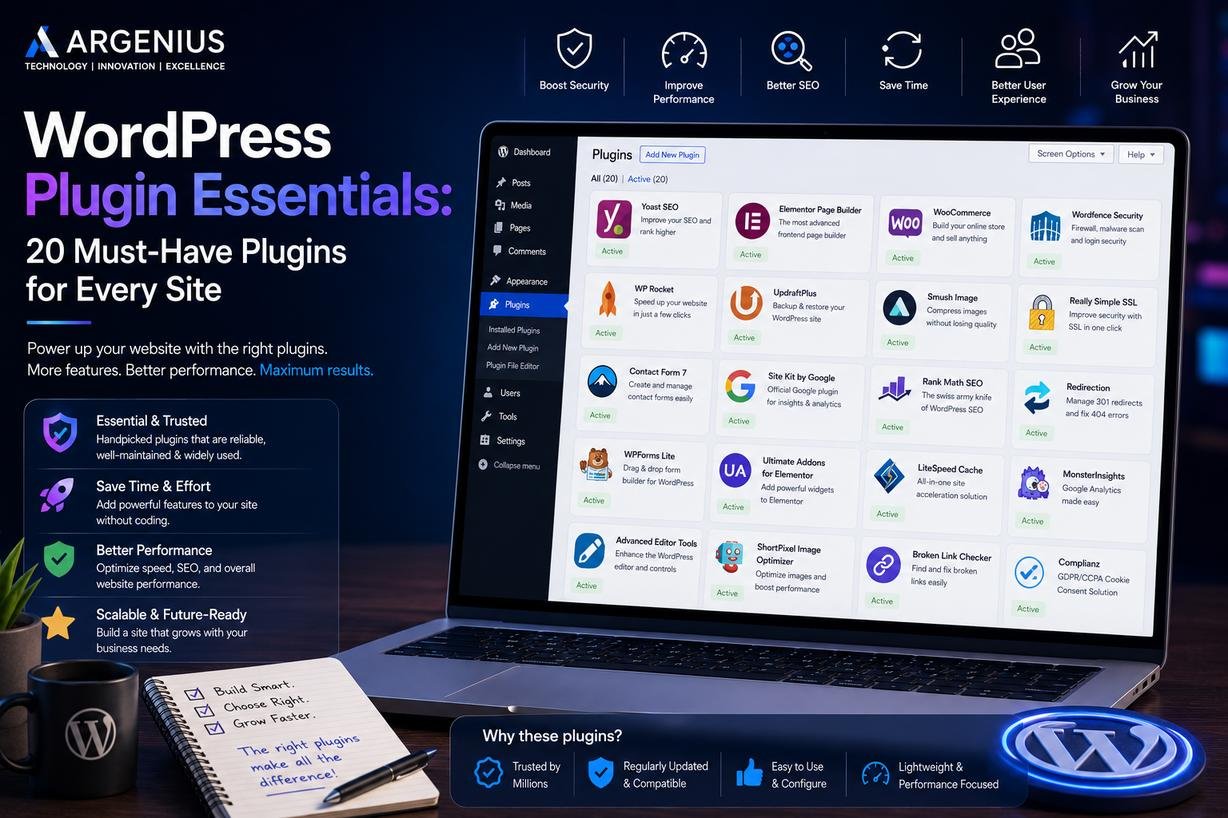
Choosing the right WordPress plugins can improve your website's speed, security, SEO, and user experience. Explore 20 essential WordPress plugins recommended for every business website.
Why Plugins Are Important for a WordPress Website
One of the biggest reasons WordPress powers millions of websites worldwide is its flexibility. Instead of building every feature from scratch, you can extend your website using plugins that add new functionality with minimal effort.
From improving SEO and website speed to strengthening security and creating contact forms, plugins help transform a basic website into a powerful business platform.
However, installing too many plugins—or choosing poorly maintained ones—can slow your website, create compatibility issues, and even introduce security risks. The goal isn't to install the most plugins; it's to choose the right plugins that genuinely improve your website.
At Argenius, we always recommend selecting plugins based on your business requirements rather than trends. A lightweight, well-maintained website consistently performs better than one overloaded with unnecessary features.
What Makes a Good WordPress Plugin?
Before installing any plugin, consider these factors:
- Regular updates
- Good user ratings
- Active developer support
- Compatibility with the latest WordPress version
- Lightweight performance
- Strong security reputation
- Clear documentation
Choosing trusted plugins reduces future maintenance issues and helps keep your website secure.
20 Must-Have WordPress Plugins
1. Rank Math SEO
Helps optimize your website for search engines by managing titles, meta descriptions, schema markup, XML sitemaps, and on-page SEO recommendations.
2. Yoast SEO
A popular alternative for improving on-page SEO, readability analysis, and technical optimization.
3. WP Rocket
One of the most effective premium caching plugins for improving loading speed and Core Web Vitals.
4. LiteSpeed Cache
A powerful caching solution, especially for websites hosted on LiteSpeed servers.
5. Wordfence Security
Provides firewall protection, malware scanning, login security, and real-time monitoring to protect your website.
6. UpdraftPlus
Automatically creates backups of your website and allows quick restoration if something goes wrong.
7. Elementor
A drag-and-drop page builder that helps create professional landing pages without writing code.
8. Contact Form 7
A lightweight plugin for creating contact forms, inquiry forms, and lead generation forms.
9. WPForms
An easy-to-use form builder suitable for businesses needing advanced contact forms, surveys, and payment forms.
10. Smush
Optimizes and compresses images without reducing visual quality, helping improve loading speed.
11. ShortPixel Image Optimizer
Automatically compresses images and converts them into modern formats like WebP.
12. Redirection
Helps manage 301 redirects and prevents broken links that can negatively affect SEO.
13. Broken Link Checker
Scans your website for broken internal and external links, making website maintenance much easier.
14. WooCommerce
Essential for businesses planning to sell products or services online.
15. MonsterInsights
Connects Google Analytics with WordPress and provides useful visitor insights directly inside the dashboard.
16. Akismet Anti-Spam
Automatically filters spam comments and helps keep your website clean.
17. Really Simple SSL
Makes it easier to configure SSL correctly after enabling HTTPS.
18. Site Kit by Google
Brings together Search Console, Analytics, PageSpeed Insights, and AdSense data within WordPress.
19. WP Mail SMTP
Improves email delivery by configuring WordPress to send emails using SMTP instead of the default PHP mail function.
20. Advanced Custom Fields (ACF)
A valuable plugin for developers who need to create custom fields and build dynamic websites with greater flexibility.
How Many Plugins Should You Install?
There is no fixed number.
Some websites perform perfectly with 15 plugins, while others experience issues with only 8.
Instead of counting plugins, focus on:
- Plugin quality
- Performance impact
- Regular maintenance
- Trusted developers
A well-optimized website with carefully selected plugins is always better than installing dozens of unnecessary extensions.
Common Plugin Mistakes to Avoid
Many WordPress websites become slow or unstable because of poor plugin management.
Avoid these common mistakes:
- Installing multiple plugins for the same purpose
- Using outdated plugins
- Downloading nulled or pirated plugins
- Ignoring updates
- Keeping inactive plugins installed
- Installing plugins from unknown developers
- Not testing plugins before using them on a live website
Good plugin management improves both website performance and security.
Why Plugin Selection Matters for SEO and Performance
Every plugin you install adds code to your website. Poorly coded plugins can increase loading times, generate unnecessary database queries, and create conflicts with themes or other plugins.
Choosing optimized plugins helps maintain fast loading speeds, better Core Web Vitals, and a smoother user experience. This contributes positively to search engine optimization and visitor engagement.
At Argenius, plugin selection is an important part of every WordPress project. Rather than relying on dozens of plugins, we focus on lightweight, reliable solutions that support long-term website performance and scalability.
Final Thoughts
WordPress plugins make it possible to add powerful features without building everything from scratch, but selecting the right ones requires careful planning. Prioritize plugins that are actively maintained, compatible with the latest WordPress version, and supported by reputable developers.
A combination of SEO, security, backup, caching, image optimization, and analytics plugins creates a solid foundation for most business websites. At the same time, avoid installing unnecessary plugins that add complexity without providing real value.
At Argenius, we help businesses build secure, high-performance WordPress websites by selecting only the plugins that align with their goals. Whether you need a company website, an eCommerce store, or a custom business solution, our team focuses on creating websites that are fast, reliable, and easy to maintain.
Frequently Asked Questions
How many WordPress plugins are too many?
There is no ideal number. The quality and efficiency of plugins matter far more than the total count.
Which plugin is best for WordPress SEO?
Rank Math and Yoast SEO are two of the most popular choices. The right option depends on your website's needs and your preferred workflow.
Do plugins slow down WordPress?
Well-coded plugins have minimal impact, but installing too many or using poorly maintained plugins can reduce website performance.
Should I update plugins regularly?
Yes. Regular updates improve security, compatibility, and performance while fixing known issues.
Can I use free WordPress plugins?
Yes. Many free plugins are excellent for business websites, provided they come from trusted developers and receive regular updates.