Firebase has transformed mobile app development by providing developers with a complete Backend-as-a-Service (BaaS) platform. From real-time databases and authentication to cloud storage and push notifications, Firebase simplifies backend development while enabling businesses to build scalable Android and iOS applications faster.
Introduction
Modern mobile applications require much more than an attractive interface. Users expect instant synchronization, secure authentication, cloud storage, push notifications, offline access, analytics, and real-time updates. Building all these backend services from scratch can significantly increase development time, infrastructure costs, and maintenance efforts.
This is where Firebase has changed the way developers build mobile applications.
Developed by Google, Firebase is a powerful Backend-as-a-Service (BaaS) platform that provides ready-to-use backend services for Android, iOS, and web applications. Instead of spending months building authentication systems, database servers, notification services, and analytics platforms, developers can integrate Firebase and focus on creating exceptional user experiences.
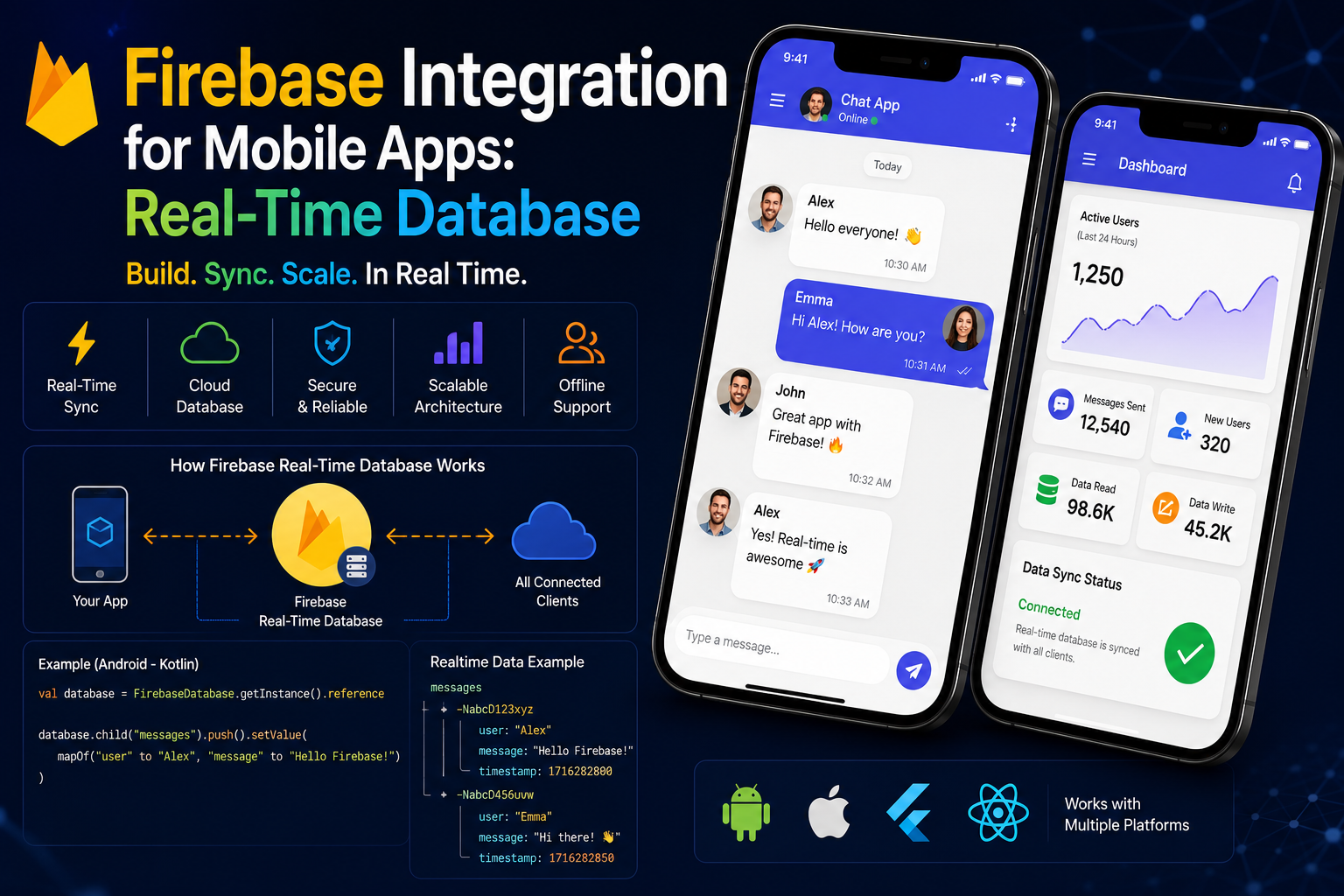
One of Firebase's most valuable features is its Real-Time Database, which allows data to synchronize instantly across connected devices. Whether it's a chat application, food delivery platform, ride-booking app, multiplayer game, or collaborative productivity tool, Firebase ensures users always see the latest information without manually refreshing the application.
Today, startups and enterprises alike use Firebase to reduce development time, lower infrastructure costs, and launch products faster.
In this guide, we'll explore Firebase Integration for Mobile Apps, understand how the Real-Time Database works, discuss its architecture, features, business benefits, and discover why Firebase remains one of the most popular backend solutions for modern mobile development.
At Argenius, we integrate Firebase into Android and iOS applications to build scalable, secure, and real-time mobile experiences that support rapid business growth.
What is Firebase?
Firebase is Google's cloud-based Backend-as-a-Service (BaaS) platform that provides developers with a collection of tools and services for building, deploying, monitoring, and scaling applications.
Instead of managing servers manually, developers can use Firebase to handle many backend responsibilities automatically.
Firebase provides services such as:
- Realtime Database
- Cloud Firestore
- Authentication
- Cloud Storage
- Firebase Cloud Messaging (FCM)
- Analytics
- Crashlytics
- Remote Config
- Performance Monitoring
- Cloud Functions
By combining these services, developers can create complete backend systems without managing traditional server infrastructure.
Why Businesses Choose Firebase
Businesses increasingly choose Firebase because it simplifies backend development while reducing operational complexity.
Some major business benefits include:
- Faster application development
- Reduced backend infrastructure costs
- Real-time data synchronization
- Easy scalability
- Secure user authentication
- Built-in cloud services
- Reliable Google Cloud infrastructure
- Lower maintenance requirements
These advantages make Firebase particularly attractive for startups launching MVPs and businesses seeking rapid product development.
Firebase Architecture
Firebase follows a cloud-based architecture where Google's managed infrastructure handles servers, databases, authentication, storage, and messaging services.
A typical Firebase-powered application includes:
- Mobile Application
- Firebase SDK
- Authentication Service
- Database Layer
- Cloud Storage
- Cloud Functions
- Push Notification Service
- Analytics Dashboard
- Google Cloud Infrastructure
Because most backend services are fully managed, developers spend less time maintaining servers and more time building features.
Firebase Realtime Database
The Firebase Realtime Database is one of Firebase's most recognized features.
Unlike traditional databases where users must repeatedly request updated information, the Realtime Database automatically synchronizes data across all connected devices whenever changes occur.
For example, if one user sends a message in a chat application, every connected user immediately receives the update without refreshing the application.
This makes it ideal for applications requiring instant communication.
Common use cases include:
- Live Chat
- Messaging Apps
- Multiplayer Games
- Food Delivery Tracking
- Ride Booking
- Live Sports Scores
- Collaborative Applications
- IoT Dashboards
The Realtime Database stores data as a large JSON tree, enabling rapid synchronization across devices.
Cloud Firestore
Cloud Firestore is Firebase's modern NoSQL database and is now the recommended database solution for most new Firebase projects.
Compared to the Realtime Database, Firestore offers:
- Better scalability
- More advanced queries
- Improved performance
- Offline synchronization
- Strong security
- Flexible document-based storage
Firestore stores data using Collections and Documents, making it easier to organize complex application data.
Many businesses choose Firestore for large-scale production applications because it provides greater flexibility while maintaining excellent performance.
Firebase Authentication
Authentication is one of the first features every mobile application requires.
Firebase Authentication simplifies secure user login by supporting multiple authentication methods.
Developers can implement:
- Email & Password Login
- Google Sign-In
- Apple Sign-In
- Facebook Login
- Phone Number Verification
- Anonymous Authentication
- Custom Authentication
Firebase securely manages user identities while reducing the need to build custom authentication systems from scratch.
Firebase Cloud Storage
Most modern mobile applications need to upload and manage files such as:
- Profile Images
- Documents
- Videos
- Product Images
- Medical Reports
- Audio Files
Firebase Cloud Storage provides secure, scalable cloud storage built on Google Cloud.
Benefits include:
- Fast uploads
- Automatic scaling
- Secure access rules
- High availability
- Easy SDK integration
This allows developers to store large files efficiently without maintaining separate storage servers.
Firebase Cloud Messaging (FCM)
Push notifications play an essential role in user engagement and retention.
Firebase Cloud Messaging enables developers to send notifications directly to Android, iOS, and web applications.
Popular notification use cases include:
- Order Updates
- Payment Confirmation
- Promotional Offers
- Appointment Reminders
- News Alerts
- Chat Messages
- Delivery Tracking
- System Announcements
FCM supports millions of devices and provides reliable message delivery worldwide.
Firebase Analytics
Understanding user behavior is essential for improving application performance.
Firebase Analytics automatically tracks user interactions, helping businesses understand:
- Active Users
- Screen Views
- Session Duration
- User Retention
- Conversion Events
- Revenue Metrics
- Device Information
- Geographic Distribution
These insights enable businesses to make informed product decisions based on real user behavior.
Crashlytics
No application is completely free from errors.
Firebase Crashlytics helps developers identify, prioritize, and resolve crashes quickly.
It provides:
- Real-time crash reports
- Device information
- Error logs
- Stack traces
- Crash frequency
- User impact analysis
This significantly reduces debugging time while improving application stability.
Why Firebase is Popular for Mobile Apps
Firebase has become one of the most widely adopted mobile backend platforms because it combines multiple services into a single ecosystem.
Some of the biggest reasons businesses choose Firebase include:
- Rapid backend development
- Real-time synchronization
- Reliable Google infrastructure
- Automatic scaling
- Built-in authentication
- Cloud storage
- Push notifications
- Analytics and monitoring
- Easy SDK integration
- Reduced operational costs
For startups, Firebase enables faster MVP launches. For growing businesses, it offers the scalability required to support increasing user demand without extensive backend management.
Firebase vs Node.js
Firebase and Node.js are both popular backend solutions for mobile applications, but they follow completely different approaches.
Firebase is a Backend-as-a-Service (BaaS) platform where Google manages the backend infrastructure, while Node.js is a server-side JavaScript runtime that gives developers complete control over the backend architecture.
| Feature |
Firebase |
Node.js |
| Type |
Backend-as-a-Service |
Custom Backend Runtime |
| Server Management |
Managed by Google |
Developer Managed |
| Real-Time Database |
Built-in |
Requires Database Integration |
| Authentication |
Built-in |
Custom Implementation |
| Scalability |
Automatic |
Configurable |
| Backend Flexibility |
Limited |
Complete Control |
| Best For |
MVPs & Rapid Development |
Enterprise & Custom Applications |
Choose Firebase When
- You want to launch an MVP quickly.
- Real-time synchronization is required.
- You don't want to manage backend servers.
- Development speed is the highest priority.
- Your application has standard backend requirements.
Choose Node.js When
- You need complete backend customization.
- Complex business logic is involved.
- Large-scale enterprise architecture is required.
- You want full control over APIs and databases.
- Long-term scalability is a major requirement.
Firebase vs Supabase
Supabase has emerged as one of Firebase's strongest competitors by offering an open-source backend platform built around PostgreSQL.
| Feature |
Firebase |
Supabase |
| Database |
NoSQL |
PostgreSQL |
| Open Source |
No |
Yes |
| Authentication |
Built-in |
Built-in |
| Real-Time Support |
Yes |
Yes |
| SQL Support |
No |
Yes |
| Google Ecosystem |
Excellent |
Limited |
| Best For |
Mobile Apps |
SQL-Based Applications |
Businesses preferring relational databases often choose Supabase, while Firebase remains a popular choice for rapid mobile application development.
Firebase vs AWS Amplify
AWS Amplify is Amazon's cloud-based development platform that provides backend services similar to Firebase.
| Feature |
Firebase |
AWS Amplify |
| Cloud Provider |
Google Cloud |
Amazon Web Services |
| Learning Curve |
Easy |
Moderate |
| Real-Time Database |
Yes |
Yes |
| Authentication |
Yes |
Yes |
| Cloud Functions |
Yes |
Yes |
| Enterprise Integration |
Good |
Excellent |
| Infrastructure Control |
Limited |
More Flexible |
Firebase is often preferred by startups because of its simplicity, while AWS Amplify is commonly selected by organizations already invested in AWS.
Security Best Practices
Although Firebase manages much of the backend infrastructure, application security still depends on proper implementation.
Some essential security practices include:
Configure Firebase Security Rules
Always define database access rules to prevent unauthorized users from reading or modifying sensitive data.
Enable Authentication
Protect private resources by requiring secure user authentication before granting access.
Validate Client Data
Never trust user input. Validate data before writing it to the database.
Use Cloud Functions
Move sensitive business logic to Cloud Functions instead of exposing it directly in the client application.
Protect API Keys
Restrict Firebase API keys and configure them according to your application's requirements.
Regularly Review Permissions
Audit Firebase rules and user permissions to minimize security risks as your application evolves.
Performance Optimization
Firebase provides excellent performance out of the box, but following best practices helps ensure your application remains fast and responsive.
Recommended optimizations include:
- Design efficient database structures
- Minimize unnecessary reads and writes
- Use pagination for large datasets
- Cache frequently accessed data
- Optimize media files before upload
- Monitor application performance with Firebase Performance Monitoring
- Reduce network requests where possible
These practices improve both user experience and operational efficiency.
Advantages of Firebase
Firebase simplifies mobile backend development while providing powerful cloud services.
Some of its major advantages include:
- Fast application development
- Real-time data synchronization
- Fully managed infrastructure
- Automatic scaling
- Built-in authentication
- Cloud storage
- Push notifications
- Analytics integration
- Crash reporting
- Offline data support
- Easy SDK integration
- Global Google Cloud infrastructure
These features allow development teams to focus on building product features instead of managing backend servers.
Limitations of Firebase
While Firebase is a powerful platform, it may not be suitable for every application.
Some common limitations include:
- Vendor lock-in with Google Cloud
- Limited flexibility for highly customized backend logic
- NoSQL database may not fit every project
- Costs can increase significantly as applications scale
- Complex querying compared to SQL databases
- Limited control over underlying infrastructure
Businesses with highly specialized backend requirements may eventually migrate to custom backend solutions.
Best Use Cases for Firebase
Firebase is an excellent choice for applications requiring rapid development and real-time functionality.
Popular use cases include:
- Chat Applications
- Food Delivery Apps
- Taxi Booking Platforms
- Social Networking Apps
- Education Apps
- Healthcare Applications
- Live Sports Applications
- Event Booking Platforms
- Multiplayer Games
- Startup MVPs
- IoT Applications
- Business Productivity Tools
Its extensive feature set allows developers to build modern applications without creating backend systems from scratch.
Industries Using Firebase
Firebase is used across a wide range of industries.
Some of the most common include:
- E-commerce
- Healthcare
- Education
- Banking & Finance
- Logistics
- Media & Entertainment
- Travel & Hospitality
- Real Estate
- SaaS Products
- Startups
Organizations value Firebase because it enables faster product launches while reducing backend maintenance.
Common Mistakes Businesses Make
Many Firebase implementations encounter issues due to poor planning rather than platform limitations.
Avoid these common mistakes:
- Using default security rules
- Poor database structure design
- Storing unnecessary data
- Ignoring cost optimization
- Writing excessive client-side logic
- Not using Cloud Functions for sensitive operations
- Skipping analytics implementation
- Failing to monitor crashes
- Ignoring offline synchronization requirements
- Choosing Firebase without evaluating long-term scalability
A well-planned Firebase architecture reduces technical debt and improves application performance.
Future of Firebase
Firebase continues to evolve alongside Google Cloud and modern application development practices.
Several trends are shaping its future:
- Better AI and machine learning integration
- Improved serverless capabilities
- Enhanced security features
- Stronger analytics tools
- Better cloud scalability
- Expanded developer tooling
- Deeper integration with Google Cloud services
- Continued support for cross-platform applications
As businesses continue adopting serverless architectures, Firebase is expected to remain a leading Backend-as-a-Service platform.
Why Businesses Choose Argenius
Choosing Firebase is only one part of building a successful mobile application. Proper architecture, database design, security, and optimization are equally important.
At Argenius, we help businesses integrate Firebase into Android and iOS applications while ensuring scalability, security, and high performance.
Our services include Firebase architecture planning, authentication setup, Cloud Firestore integration, Realtime Database implementation, Cloud Functions, Firebase Cloud Messaging, analytics integration, Crashlytics configuration, performance optimization, and long-term maintenance.
Whether you're launching a startup MVP or developing a production-ready enterprise application, our team ensures your Firebase implementation is built for future growth.
Final Thoughts
Firebase has transformed mobile application development by making powerful backend services accessible without requiring businesses to build and maintain complex server infrastructure.
Its Real-Time Database, Cloud Firestore, Authentication, Cloud Storage, Push Notifications, Analytics, and Crashlytics provide developers with everything needed to build modern Android and iOS applications efficiently.
For startups, Firebase dramatically reduces development time and infrastructure costs. For growing businesses, it offers the scalability required to support increasing user demand while simplifying backend management.
If you're looking for a fast, reliable, and scalable backend solution for your next mobile application, Firebase remains one of the strongest choices available.
At Argenius, we help businesses build secure, high-performance Firebase-powered applications that deliver exceptional user experiences and support long-term digital growth.
Frequently Asked Questions
What is Firebase used for in mobile apps?
Firebase provides backend services such as databases, authentication, cloud storage, push notifications, analytics, crash reporting, and real-time synchronization for Android and iOS applications.
What is the difference between Firebase Realtime Database and Cloud Firestore?
Realtime Database stores data as a JSON tree and is optimized for instant synchronization, while Cloud Firestore uses a document-based structure, supports advanced queries, and is recommended for most new Firebase projects.
Is Firebase free?
Firebase offers a generous free tier through the Spark Plan. As application usage grows, businesses can upgrade to the Blaze Plan with pay-as-you-go pricing.
Can Firebase replace a custom backend?
For many startups and standard mobile applications, yes. However, applications with highly complex business logic or specialized infrastructure may benefit from a custom backend using technologies like Node.js or Laravel.
Is Firebase secure?
Yes. Firebase provides strong security features, including Authentication, Security Rules, encrypted communication, and integration with Google Cloud security services. Proper configuration is essential for maximum protection.
Does Firebase support offline access?
Yes. Both Realtime Database and Cloud Firestore provide offline capabilities, allowing users to continue working even without an internet connection.
Which industries use Firebase?
Firebase is widely used in eCommerce, healthcare, education, logistics, travel, media, fintech, startups, and SaaS applications.
Can Argenius integrate Firebase into existing mobile apps?
Yes. Argenius offers complete Firebase integration services, including Authentication, Firestore, Realtime Database, Cloud Functions, Push Notifications, Analytics, Crashlytics, and ongoing support.