Support By : +91 63927 02800

Insight & Strategy

App Analytics Setup: Track User Behavior & Improve App Performance

Have questions about this topic or want to discuss how it applies to your product? Tell us about your idea and we'll get back with a plan.

App Analytics Setup: Track User Behavior & Improve App Performance
  • By Ayushi
  • Aug 07, 2026
  • Mobile App

App Analytics Setup: Track User Behavior & Improve App Performance

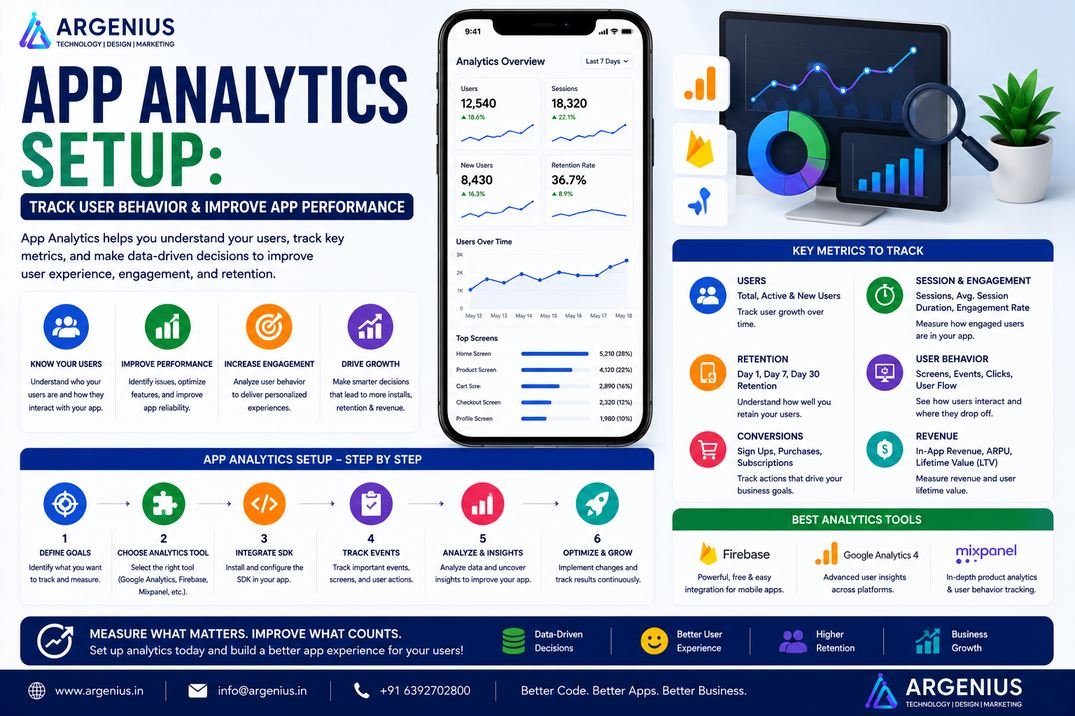
Understanding how users interact with your mobile application is essential for growth. This guide explains how to set up app analytics, track user behavior, monitor engagement, measure conversions, and use data to improve your application's performance and user experience.

Launching a mobile application is only the first step toward success. Once users begin downloading and interacting with your app, one important question remains: How do you know what they're actually doing?

Without analytics, businesses rely on assumptions. You might believe users love a feature when they rarely use it, or assume people are completing purchases when many abandon the checkout process. Decisions based on guesswork can lead to wasted development time and missed business opportunities.

App analytics removes that uncertainty by providing real data about user behavior. It helps businesses understand how users discover the app, which features they use most, where they spend their time, when they leave, and what actions lead to conversions. These insights allow teams to improve user experience, optimize marketing campaigns, increase retention, and make smarter product decisions.

Modern analytics platforms collect information about sessions, events, screens, user journeys, crashes, engagement, revenue, and much more. Instead of simply counting downloads, businesses can monitor the complete customer lifecycle and identify opportunities for continuous improvement.

Whether you're building an eCommerce platform, healthcare application, fintech solution, education app, food delivery service, or enterprise software, analytics plays a critical role in measuring success and supporting long-term growth.

In this guide, you'll learn how app analytics works, which metrics matter most, the best analytics tools, implementation strategies, and best practices for tracking user behavior effectively.

At Argenius, we integrate advanced analytics solutions into mobile applications so businesses can make data-driven decisions, improve customer experiences, and accelerate growth.


What is App Analytics?

App analytics is the process of collecting, measuring, analyzing, and interpreting user interaction data within a mobile application.

It helps businesses understand how users behave, identify trends, measure business performance, and optimize the application based on real usage patterns.

App analytics provides insights into:

  • User Behavior
  • Screen Views
  • Session Duration
  • Feature Usage
  • Conversion Rates
  • User Retention
  • Revenue
  • App Performance
  • User Engagement
  • Customer Journey

Analytics transforms raw data into actionable business insights.


Why App Analytics is Important

Analytics enables businesses to make informed decisions instead of relying on assumptions.

Key benefits include:

  • Better User Experience
  • Higher User Retention
  • Improved Customer Engagement
  • Data-Driven Decisions
  • Increased Conversion Rates
  • Better Marketing ROI
  • Faster Product Improvements
  • Reduced User Drop-Off
  • Revenue Optimization
  • Smarter Feature Planning

Organizations that use analytics effectively can continuously improve their products and services.


What Can You Track?

Modern analytics platforms provide detailed insights into almost every aspect of user activity.

Common tracking metrics include:

  • App Installs
  • Daily Active Users (DAU)
  • Monthly Active Users (MAU)
  • Session Duration
  • Screen Views
  • Button Clicks
  • Feature Usage
  • Purchases
  • Subscription Conversions
  • User Retention

Tracking these metrics helps businesses understand what drives growth and where improvements are needed.


Types of Analytics

Different types of analytics answer different business questions.

User Analytics

Focuses on understanding individual user behavior.

Examples include:

  • User Demographics
  • Active Users
  • Returning Users
  • User Lifetime Value (LTV)
  • User Segments

Event Analytics

Tracks specific actions users perform within the application.

Examples include:

  • Login
  • Registration
  • Add to Cart
  • Purchase
  • Payment Success
  • Search
  • Video Play
  • Form Submission

Funnel Analytics

Measures how users progress through important workflows.

Common funnels include:

  • Registration Funnel
  • Checkout Funnel
  • Subscription Funnel
  • Booking Funnel
  • Onboarding Funnel

Funnel analysis helps identify where users abandon a process.


Retention Analytics

Retention analytics measures how many users continue using the application over time.

Important metrics include:

  • Day 1 Retention
  • Day 7 Retention
  • Day 30 Retention
  • Churn Rate
  • Returning Users

High retention usually indicates a valuable and engaging application.


Revenue Analytics

Revenue analytics helps businesses evaluate financial performance.

Common metrics include:

  • Total Revenue
  • In-App Purchases
  • Subscription Revenue
  • Average Revenue Per User (ARPU)
  • Customer Lifetime Value (CLV)

Key Performance Indicators (KPIs)

Every business should monitor a core set of analytics metrics.

Important KPIs include:

  • Downloads
  • Active Users
  • Retention Rate
  • Churn Rate
  • Session Duration
  • Conversion Rate
  • Customer Acquisition Cost (CAC)
  • Lifetime Value (LTV)
  • Crash Rate
  • Revenue Growth

Tracking KPIs regularly helps measure business success.


Industries That Benefit from App Analytics

Analytics is valuable across nearly every industry.

Examples include:

  • eCommerce
  • Healthcare
  • Banking & FinTech
  • Education
  • Food Delivery
  • Logistics
  • Travel
  • Social Media
  • Gaming
  • Enterprise Software

Every industry benefits from understanding user behavior and making informed business decisions.


Recommended Analytics Tools

User Analytics

  • Firebase Analytics
  • Mixpanel
  • Amplitude

Product Analytics

  • Heap
  • CleverTap

Performance Monitoring

  • Firebase Performance Monitoring
  • New Relic
  • Sentry

Marketing Attribution

  • AppsFlyer
  • Adjust
  • Branch

Dashboard & Reporting

  • Google Looker Studio
  • Power BI
  • Tableau

Using the right analytics tools helps businesses collect meaningful insights, measure growth, and continuously improve application performance.

Launching a mobile application is only the first step toward success. Once users begin downloading and interacting with your app, one important question remains: How do you know what they're actually doing?

Without analytics, businesses rely on assumptions. You might believe users love a feature when they rarely use it, or assume people are completing purchases when many abandon the checkout process. Decisions based on guesswork can lead to wasted development time and missed business opportunities.

App analytics removes that uncertainty by providing real data about user behavior. It helps businesses understand how users discover the app, which features they use most, where they spend their time, when they leave, and what actions lead to conversions. These insights allow teams to improve user experience, optimize marketing campaigns, increase retention, and make smarter product decisions.

Modern analytics platforms collect information about sessions, events, screens, user journeys, crashes, engagement, revenue, and much more. Instead of simply counting downloads, businesses can monitor the complete customer lifecycle and identify opportunities for continuous improvement.

Whether you're building an eCommerce platform, healthcare application, fintech solution, education app, food delivery service, or enterprise software, analytics plays a critical role in measuring success and supporting long-term growth.

In this guide, you'll learn how app analytics works, which metrics matter most, the best analytics tools, implementation strategies, and best practices for tracking user behavior effectively.

At Argenius, we integrate advanced analytics solutions into mobile applications so businesses can make data-driven decisions, improve customer experiences, and accelerate growth.


What is App Analytics?

App analytics is the process of collecting, measuring, analyzing, and interpreting user interaction data within a mobile application.

It helps businesses understand how users behave, identify trends, measure business performance, and optimize the application based on real usage patterns.

App analytics provides insights into:

  • User Behavior
  • Screen Views
  • Session Duration
  • Feature Usage
  • Conversion Rates
  • User Retention
  • Revenue
  • App Performance
  • User Engagement
  • Customer Journey

Analytics transforms raw data into actionable business insights.


Why App Analytics is Important

Analytics enables businesses to make informed decisions instead of relying on assumptions.

Key benefits include:

  • Better User Experience
  • Higher User Retention
  • Improved Customer Engagement
  • Data-Driven Decisions
  • Increased Conversion Rates
  • Better Marketing ROI
  • Faster Product Improvements
  • Reduced User Drop-Off
  • Revenue Optimization
  • Smarter Feature Planning

Organizations that use analytics effectively can continuously improve their products and services.


What Can You Track?

Modern analytics platforms provide detailed insights into almost every aspect of user activity.

Common tracking metrics include:

  • App Installs
  • Daily Active Users (DAU)
  • Monthly Active Users (MAU)
  • Session Duration
  • Screen Views
  • Button Clicks
  • Feature Usage
  • Purchases
  • Subscription Conversions
  • User Retention

Tracking these metrics helps businesses understand what drives growth and where improvements are needed.


Types of Analytics

Different types of analytics answer different business questions.

User Analytics

Focuses on understanding individual user behavior.

Examples include:

  • User Demographics
  • Active Users
  • Returning Users
  • User Lifetime Value (LTV)
  • User Segments

Event Analytics

Tracks specific actions users perform within the application.

Examples include:

  • Login
  • Registration
  • Add to Cart
  • Purchase
  • Payment Success
  • Search
  • Video Play
  • Form Submission

Funnel Analytics

Measures how users progress through important workflows.

Common funnels include:

  • Registration Funnel
  • Checkout Funnel
  • Subscription Funnel
  • Booking Funnel
  • Onboarding Funnel

Funnel analysis helps identify where users abandon a process.


Retention Analytics

Retention analytics measures how many users continue using the application over time.

Important metrics include:

  • Day 1 Retention
  • Day 7 Retention
  • Day 30 Retention
  • Churn Rate
  • Returning Users

High retention usually indicates a valuable and engaging application.


Revenue Analytics

Revenue analytics helps businesses evaluate financial performance.

Common metrics include:

  • Total Revenue
  • In-App Purchases
  • Subscription Revenue
  • Average Revenue Per User (ARPU)
  • Customer Lifetime Value (CLV)

Key Performance Indicators (KPIs)

Every business should monitor a core set of analytics metrics.

Important KPIs include:

  • Downloads
  • Active Users
  • Retention Rate
  • Churn Rate
  • Session Duration
  • Conversion Rate
  • Customer Acquisition Cost (CAC)
  • Lifetime Value (LTV)
  • Crash Rate
  • Revenue Growth

Tracking KPIs regularly helps measure business success.


Industries That Benefit from App Analytics

Analytics is valuable across nearly every industry.

Examples include:

  • eCommerce
  • Healthcare
  • Banking & FinTech
  • Education
  • Food Delivery
  • Logistics
  • Travel
  • Social Media
  • Gaming
  • Enterprise Software

Every industry benefits from understanding user behavior and making informed business decisions.


Recommended Analytics Tools

User Analytics

  • Firebase Analytics
  • Mixpanel
  • Amplitude

Product Analytics

  • Heap
  • CleverTap

Performance Monitoring

  • Firebase Performance Monitoring
  • New Relic
  • Sentry

Marketing Attribution

  • AppsFlyer
  • Adjust
  • Branch

Dashboard & Reporting

  • Google Looker Studio
  • Power BI
  • Tableau

Using the right analytics tools helps businesses collect meaningful insights, measure growth, and continuously improve application performance.