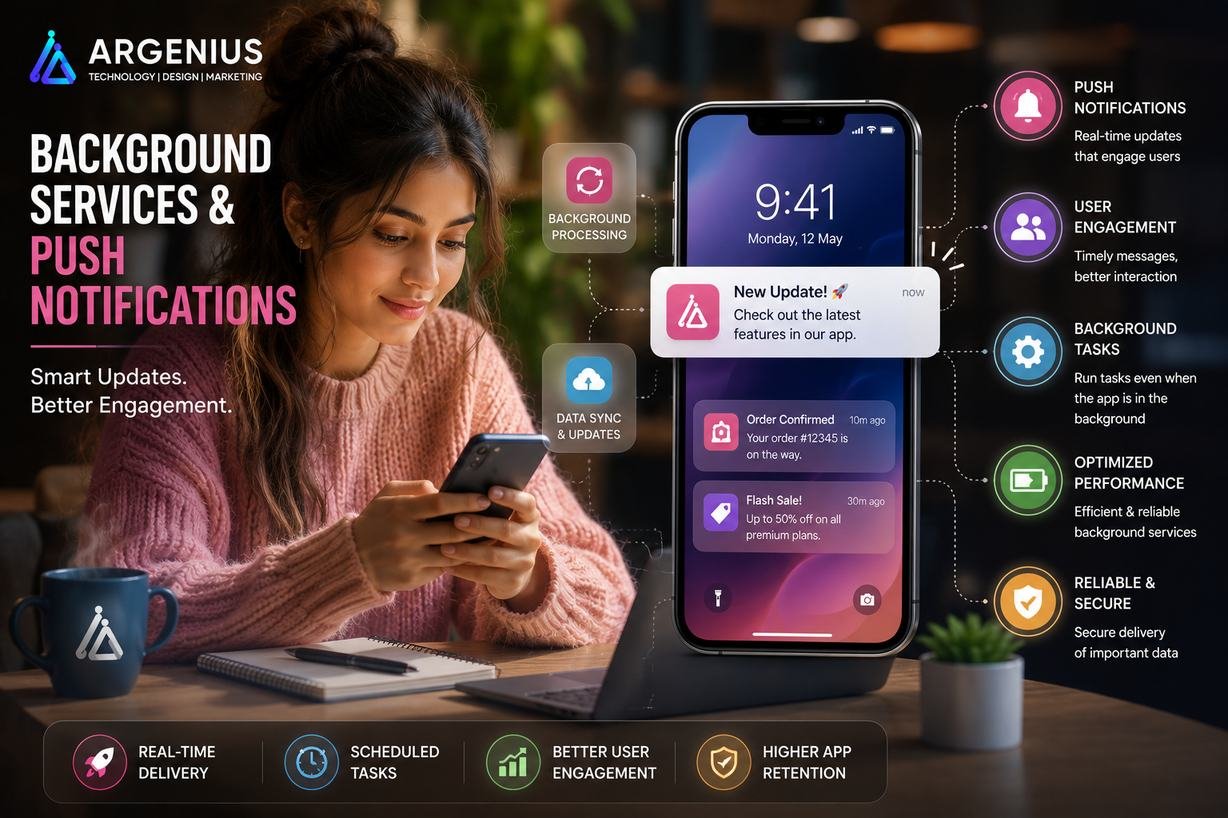
Push notifications and background services are essential for modern mobile applications. They help apps stay active even when users aren't using them, enabling real-time updates, reminders, order tracking, chat messages, and automatic data synchronization. This guide explains everything you need to know about implementing reliable and scalable notification systems.
Have you ever wondered how your favorite apps notify you about a new message, remind you about an upcoming appointment, or update you when your food order is out for delivery—even when the app isn't open?
The answer lies in background services and push notifications.
These two technologies work together behind the scenes to keep mobile applications active, responsive, and connected with users. Instead of requiring people to open an app repeatedly, businesses can deliver important updates instantly, improving engagement while providing a much better user experience.
Today's users expect real-time communication. Whether it's a banking alert, a doctor's appointment reminder, a ride arrival notification, or a flash sale announcement, timely notifications help users stay informed and take action immediately.
Background services play an equally important role. They quietly perform tasks such as syncing data, uploading files, checking for updates, tracking locations, downloading new content, and refreshing information—even when the application is running in the background.
Without proper background processing, many modern apps simply wouldn't function as users expect. Imagine a messaging app that only receives new messages after being opened or a delivery app that stops updating once it's minimized. These experiences quickly frustrate users and reduce trust in the application.
Building an effective notification system requires much more than sending messages. Developers must carefully manage notification permissions, background execution limits, battery optimization, message priorities, scheduling, user preferences, and security to ensure notifications are timely, relevant, and non-intrusive.
In this comprehensive guide, you'll learn how background services and push notifications work, the architecture behind them, implementation strategies, notification types, recommended technologies, and best practices for creating scalable mobile applications.
At Argenius, we build intelligent mobile applications with real-time notifications and efficient background services that improve customer engagement, streamline operations, and deliver seamless experiences across Android and iOS.
What are Background Services & Push Notifications?
Background services are processes that continue running even after users minimize or close the application.
Push notifications are messages sent from a server to a user's device, allowing businesses to communicate important information instantly without requiring users to open the app.
Together, they help mobile applications perform tasks such as:
- Sending Real-Time Notifications
- Syncing Data Automatically
- Delivering Chat Messages
- Tracking Orders
- Updating Live Information
- Scheduling Reminders
- Monitoring Device Events
- Processing Background Tasks
- Triggering Location-Based Actions
- Improving User Engagement
These capabilities have become standard in modern mobile applications across almost every industry.
Why Background Services & Push Notifications Matter
Users interact with dozens of apps every day, but they don't open every app regularly. Notifications help businesses reconnect with users at the right moment.
Some of the biggest benefits include:
- Higher User Engagement
- Better Customer Retention
- Increased App Opens
- Faster Communication
- Personalized User Experience
- Higher Conversion Rates
- Reduced User Drop-Off
- Better Customer Support
- Improved Brand Recall
- Increased Revenue Opportunities
When implemented thoughtfully, notifications become a valuable communication channel instead of an annoyance.
Types of Push Notifications
Different businesses use different types of notifications depending on their goals.
Transactional Notifications
These notifications are triggered by user actions.
Examples include:
- Order Confirmation
- Payment Success
- Delivery Updates
- Booking Confirmation
- Password Reset
- OTP Verification
- Account Activation
These are essential notifications that users expect to receive immediately.
Marketing Notifications
Businesses use promotional notifications to encourage users to return to the app.
Examples include:
- Flash Sales
- Limited-Time Offers
- Discount Coupons
- Product Launches
- Festival Campaigns
- Referral Rewards
- Membership Offers
These notifications should be personalized to avoid overwhelming users.
Reminder Notifications
Reminder notifications help users complete important tasks on time.
Popular examples include:
- Medicine Reminders
- Appointment Alerts
- Bill Payment Reminders
- Subscription Renewals
- Workout Reminders
- Study Reminders
- Event Notifications
Timely reminders improve user engagement and increase app retention.
Social Notifications
Social networking applications rely heavily on instant notifications.
Common examples include:
- New Messages
- Friend Requests
- Likes
- Comments
- Mentions
- New Followers
- Group Activity
Real-time delivery is critical for maintaining active user engagement.
System Notifications
These notifications inform users about application or account activity.
Examples include:
- Security Alerts
- Login Notifications
- Maintenance Updates
- New Device Login
- App Updates
- Feature Releases
- Service Interruptions
These messages improve transparency and strengthen user trust.
How Background Services Work
Background services allow applications to perform important operations even when they are not actively being used.
A typical workflow includes:
- User performs an action.
- The app schedules a background task.
- The operating system decides the appropriate execution time.
- Background service starts processing.
- Backend APIs perform the required operation.
- The notification service prepares a message.
- The push notification is delivered to the device.
- The user taps the notification.
- The app opens the relevant screen using deep linking.
This process ensures important tasks continue running without interrupting the user experience.
Industries That Benefit from Background Services
Background processing is valuable across almost every industry.
Popular examples include:
- eCommerce Applications
- Food Delivery Platforms
- Ride Booking Apps
- Banking Applications
- Healthcare Systems
- CRM Software
- Logistics Platforms
- Social Media Apps
- Education Platforms
- Fitness Applications
- Travel & Hospitality Apps
- Enterprise Business Solutions
Essential User Features
A modern notification system should include:
- Real-Time Push Notifications
- Scheduled Notifications
- Silent Notifications
- Rich Notifications
- Notification History
- Badge Counters
- Deep Linking
- Notification Preferences
- Background Data Sync
- Offline Notification Queue
- Multi-Device Support
- Personalized Alerts
Admin Features
Administrators should have complete control over notification campaigns and background tasks.
Important features include:
- Notification Dashboard
- Campaign Management
- Audience Segmentation
- Notification Scheduling
- Delivery Reports
- Click & Open Analytics
- User Preference Management
- Failed Notification Logs
- Template Management
- Activity Monitoring
Recommended Technology Stack
Mobile Development
- Flutter
- React Native
- Kotlin
- Swift
Push Notification Services
- Firebase Cloud Messaging (FCM)
- Apple Push Notification Service (APNs)
- OneSignal
Background Processing
- Android WorkManager
- Foreground Services
- iOS Background Tasks
- Background Fetch
Backend
- Laravel
- Node.js
- Django
- Spring Boot
Database
Cloud Platforms
- Firebase
- AWS
- Microsoft Azure
Selecting the right technology stack ensures reliable notification delivery, efficient background processing, optimized battery usage, and excellent scalability as your application grows.
Background Service Architecture
A well-designed background processing system ensures that your mobile application continues performing important tasks even when users are not actively using it. Instead of stopping when the app is minimized, background services handle operations such as syncing data, checking for updates, processing uploads, and triggering notifications.
A typical architecture includes:
- Mobile Application
- Background Task Manager
- Push Notification Service
- Backend API
- Job Queue
- Database
- Cloud Messaging Service
- Analytics & Monitoring
- Authentication Service
- Logging System
This architecture provides reliable task execution while maintaining good performance and battery efficiency.
Push Notification Workflow
Every notification passes through multiple stages before reaching the user's device.
A standard workflow looks like this:
- User performs an action.
- Backend receives the request.
- Business logic validates the event.
- Notification payload is created.
- Firebase Cloud Messaging (FCM) or APNs receives the request.
- Notification is delivered to the device.
- User taps the notification.
- The app opens the relevant screen using deep linking.
- Analytics record delivery and user interaction.
This process ensures notifications are delivered quickly and reliably.
Firebase Cloud Messaging (FCM)
Firebase Cloud Messaging (FCM) is Google's official service for sending push notifications to Android, iOS, and web applications.
It is one of the most popular notification platforms because it is reliable, scalable, and easy to integrate.
Common Features
- Instant Push Notifications
- Topic Messaging
- Device Targeting
- User Segmentation
- Silent Notifications
- Rich Notifications
- Analytics Integration
- High Delivery Rate
FCM is an excellent choice for startups as well as enterprise applications.
Apple Push Notification Service (APNs)
Apple Push Notification Service (APNs) delivers notifications to iPhone, iPad, Apple Watch, and other Apple devices.
It works seamlessly with iOS applications while providing secure and efficient notification delivery.
Key capabilities include:
- Secure Notification Delivery
- Rich Notifications
- Badge Updates
- Silent Notifications
- Critical Alerts
- Background Updates
For iOS applications, APNs is the foundation of every push notification system.
Local Notifications vs Push Notifications
Both notification types serve different purposes.
| Feature |
Local Notification |
Push Notification |
| Internet Required |
No |
Yes |
| Trigger Source |
Device |
Server |
| Scheduled Alerts |
Yes |
Yes |
| Real-Time Updates |
No |
Yes |
| Marketing Campaigns |
No |
Yes |
| Offline Support |
Yes |
No |
| Best For |
Reminders |
Live Updates |
Most applications combine both methods to provide the best possible user experience.
Notification Scheduling
Not every notification should be sent immediately.
Scheduling helps businesses deliver messages at the most effective time.
Examples include:
- Appointment Reminders
- Medicine Alerts
- Daily Goals
- Subscription Renewal Notices
- Event Reminders
- Birthday Wishes
- Promotional Campaigns
Smart scheduling improves engagement while reducing notification fatigue.
Background Synchronization
Background synchronization keeps application data up to date without requiring user interaction.
Typical tasks include:
- Upload Pending Files
- Sync Offline Data
- Refresh User Information
- Download Latest Content
- Backup Local Data
- Verify Authentication Tokens
- Update Cached Resources
- Retry Failed Requests
Automatic synchronization ensures users always see the latest information.
Development Cost (₹ INR)
The cost of implementing background services and push notifications depends on application complexity, notification volume, integrations, and automation requirements.
| Solution Type |
Estimated Cost |
| Basic Push Notification Integration |
₹1,50,000 – ₹3,50,000 |
| Advanced Notification System |
₹3,50,000 – ₹8,00,000 |
| Enterprise Notification Platform |
₹8,00,000 – ₹18,00,000 |
| Large-Scale Custom Solution |
₹18,00,000+ (Custom Pricing) |
Factors Affecting Cost
Development costs depend on:
- Android & iOS Support
- Notification Volume
- Background Processing
- User Segmentation
- Analytics Dashboard
- Cloud Infrastructure
- Third-Party Integrations
- Automation Workflows
- Multi-Language Support
- Ongoing Maintenance
Security Best Practices
Push notifications often contain sensitive information. Security should always be a priority.
Recommended practices include:
- HTTPS Communication
- Secure Device Tokens
- Authentication Validation
- Token Rotation
- Role-Based Access
- Data Encryption
- Notification Permission Management
- Secure APIs
- Rate Limiting
- Activity Logging
These measures help protect user privacy while ensuring secure communication.
Common Challenges
Developers often face several challenges while implementing background services.
Some of the most common include:
- Battery Optimization Restrictions
- Delayed Notification Delivery
- Token Expiration
- Background Execution Limits
- Duplicate Notifications
- Permission Denial
- Network Connectivity Issues
- Device Manufacturer Restrictions
- Notification Spam
- Cross-Platform Compatibility
Testing across multiple devices is essential to ensure consistent behavior.
Performance Optimization
A well-optimized notification system improves reliability while minimizing battery consumption.
Best practices include:
- Send Only Relevant Notifications
- Compress Notification Payloads
- Batch Background Tasks
- Reduce Network Requests
- Use Silent Notifications Carefully
- Schedule Background Jobs Efficiently
- Monitor Delivery Analytics
- Clean Expired Device Tokens
- Optimize API Response Time
- Limit Background Processing
These optimizations improve user satisfaction and application performance.
FCM vs OneSignal vs APNs
| Feature |
FCM |
OneSignal |
APNs |
| Platform |
Android, iOS & Web |
Cross-Platform |
Apple Devices |
| Free Tier |
Yes |
Yes |
Yes |
| Analytics |
Good |
Excellent |
Basic |
| Segmentation |
Good |
Advanced |
Limited |
| Ease of Integration |
Easy |
Very Easy |
Moderate |
| Best For |
Most Apps |
Marketing Campaigns |
Native iOS Apps |
The right solution depends on your application's target audience, engagement strategy, and platform requirements.
Benefits of Background Services & Push Notifications
Implementing background processing and notifications provides significant business advantages.
Key benefits include:
- Higher User Engagement
- Improved Customer Retention
- Real-Time Communication
- Faster Task Automation
- Better Customer Experience
- Increased Conversion Rates
- Reduced Manual Processes
- Personalized User Interaction
- Better Operational Efficiency
- Stronger Brand Loyalty
These capabilities help businesses maintain continuous communication with users while improving overall application performance.
Future Trends
Background processing and notification technology continue to evolve rapidly.
Emerging trends include:
- AI-Powered Notification Personalization
- Predictive User Engagement
- Rich Interactive Notifications
- Voice Notifications
- Wearable Device Integration
- Cross-Device Synchronization
- Intelligent Notification Scheduling
- Edge Computing
- Context-Aware Notifications
- AI-Based User Behavior Analysis
These innovations will enable businesses to deliver more personalized and meaningful user experiences.
Why Businesses Choose Argenius
At Argenius, we build intelligent mobile applications with secure background processing and real-time notification systems that improve engagement, automate workflows, and increase customer retention.
Our expertise includes:
- Push Notification Integration
- Firebase Cloud Messaging (FCM)
- Apple Push Notification Service (APNs)
- Background Service Development
- Notification Automation
- Flutter & React Native Development
- Laravel & Node.js Backend Development
- API Integration
- Cloud Infrastructure
- Long-Term Maintenance & Support
Whether you're building an eCommerce platform, healthcare solution, banking application, logistics system, or social networking app, Argenius delivers scalable notification systems that keep users informed and engaged.
Final Thoughts
Background services and push notifications have become essential components of modern mobile applications. They enable apps to perform important tasks behind the scenes, deliver timely updates, and keep users connected without requiring them to constantly open the app.
A successful implementation goes beyond simply sending notifications. It requires efficient background processing, secure communication, intelligent scheduling, battery optimization, and personalized messaging to provide real value to users.
If you're planning to build a mobile application with reliable background services and push notifications, Argenius can help you create a secure, scalable, and high-performance solution tailored to your business goals.
Frequently Asked Questions
What are background services in mobile apps?
Background services allow a mobile application to perform tasks such as syncing data, tracking locations, uploading files, and refreshing content even when the app is running in the background or minimized.
What is the difference between local and push notifications?
Local notifications are generated by the device and do not require an internet connection. Push notifications are sent from a remote server through services like Firebase Cloud Messaging (FCM) or Apple Push Notification Service (APNs) and require internet connectivity.
Which notification service is best?
For most applications, Firebase Cloud Messaging (FCM) is the preferred choice because it supports Android, iOS, and web platforms. APNs is essential for native iOS apps, while OneSignal offers advanced marketing and analytics features.
How much does notification system development cost?
Basic push notification integration generally costs ₹1.5 lakh–₹3.5 lakh, while enterprise-grade notification platforms with automation, analytics, and segmentation can cost ₹18 lakh or more, depending on project complexity.
How can businesses avoid notification spam?
Businesses should send personalized, relevant, and well-timed notifications, allow users to customize notification preferences, and avoid sending excessive promotional messages that could reduce engagement.
Can Argenius build custom notification systems?
Yes. Argenius develops secure and scalable notification solutions with Firebase Cloud Messaging, APNs integration, background services, scheduling, automation, analytics, and cross-platform support for Android and iOS.