Users don't always have a reliable internet connection. Whether they're traveling, working in remote areas, or experiencing network issues, they still expect mobile apps to function smoothly. This guide explains how offline-first mobile apps work, the architecture behind them, synchronization strategies, local storage options, and best practices for building reliable applications that continue working without internet access.
Introduction
Imagine you're traveling on a flight and want to review important documents stored in your company's mobile app. Or perhaps you're a delivery executive trying to update an order in an area with poor network coverage. Maybe you're a doctor accessing patient records inside a hospital where internet connectivity is unstable. In each of these situations, users expect the app to keep working—even when the internet doesn't.
Unfortunately, many applications stop functioning the moment the network disappears. Buttons stop responding, data refuses to load, and users are greeted with frustrating error messages. Experiences like these often lead to poor reviews, abandoned sessions, and lost business opportunities.
That's why modern mobile development is moving toward an offline-first approach.
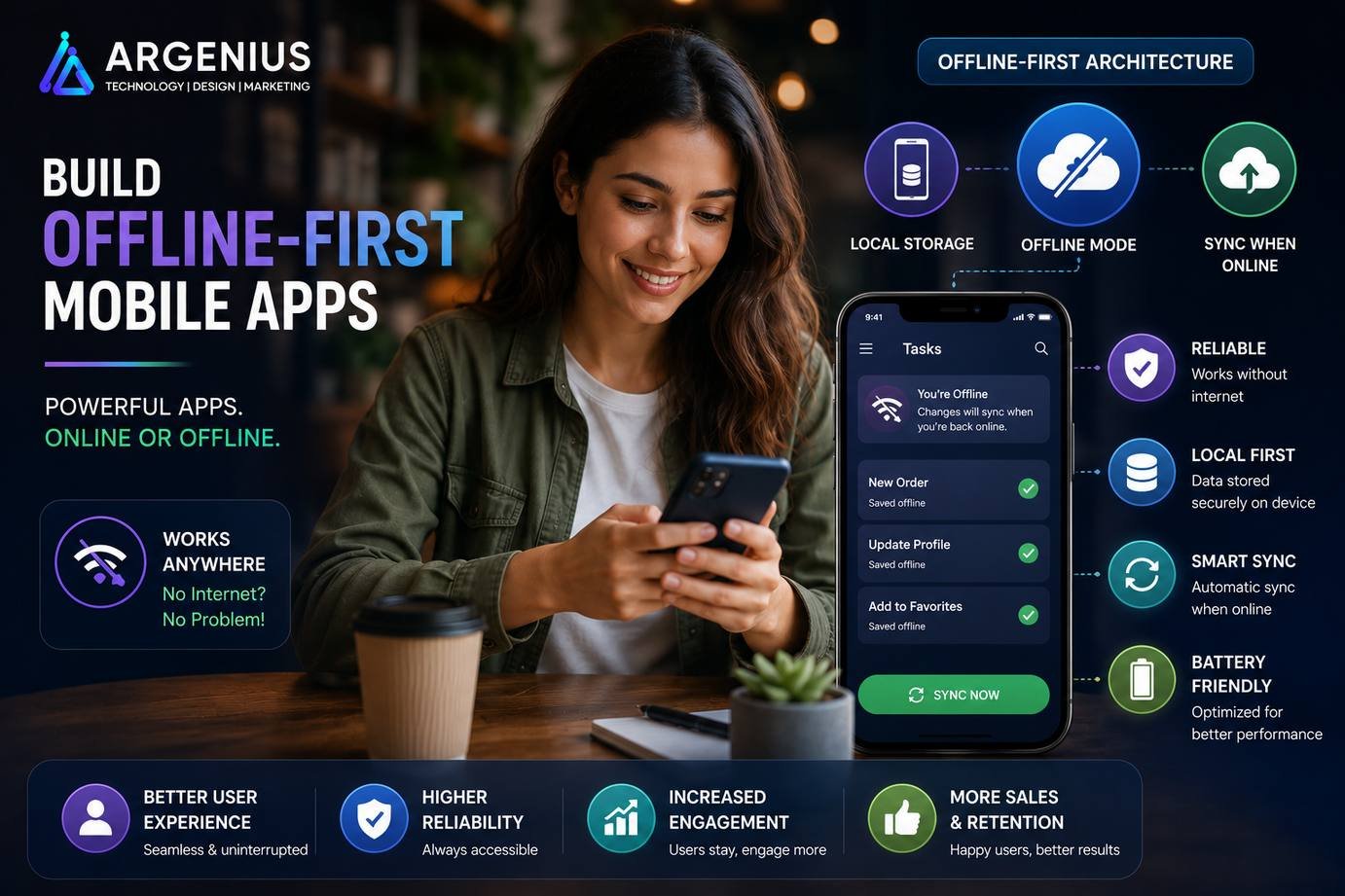
Instead of treating internet connectivity as a requirement, offline-first applications are designed to continue working even when users lose their connection. They store important data locally, allow users to keep interacting with the app, and automatically synchronize changes once the internet becomes available again.
This approach is especially valuable for industries such as healthcare, logistics, education, retail, finance, field services, and enterprise applications, where users often work in environments with unreliable networks.
Building offline functionality requires more than storing data on the device. Developers must carefully plan local databases, caching strategies, conflict resolution, synchronization logic, background tasks, and security measures to ensure users always have access to the information they need.
In this guide, you'll learn how offline-first mobile apps work, why they're becoming an industry standard, the architecture behind offline functionality, recommended technologies, synchronization strategies, and best practices for building applications that deliver a seamless experience regardless of network conditions.
At Argenius, we build intelligent offline-first mobile applications that continue working even when connectivity is limited, helping businesses improve reliability, productivity, and customer satisfaction.
What is Offline Functionality?
Offline functionality allows a mobile application to continue operating even when there is no active internet connection.
Instead of depending entirely on online servers, the application stores important information locally on the user's device and synchronizes changes with the server whenever connectivity is restored.
Common offline capabilities include:
- Viewing Previously Loaded Data
- Creating New Records
- Editing Existing Information
- Saving Drafts
- Offline Form Submission
- Offline Orders
- Local Notifications
- File Access
- Image Capture
- Background Synchronization
Offline functionality improves reliability while providing a consistent user experience in challenging network environments.
Why Offline-First Apps Matter
Internet connectivity isn't always reliable. Users travel through areas with weak signals, switch between Wi-Fi and mobile data, or work in locations where networks are unavailable.
Offline-first development ensures that productivity doesn't stop just because the connection does.
Major benefits include:
- Better User Experience
- Faster Application Performance
- Reduced Network Dependency
- Higher User Retention
- Improved Productivity
- Lower Server Requests
- Faster Screen Loading
- Reliable Data Access
- Better Customer Satisfaction
- Business Continuity
Applications that continue working offline often receive better user ratings and higher long-term engagement.
Industries That Need Offline Functionality
Offline capabilities are valuable across many industries.
Popular examples include:
Healthcare
- Patient Records
- Medical Reports
- Appointment Notes
- Prescription History
Logistics
- Delivery Updates
- Route Tracking
- Inventory Management
- Proof of Delivery
Education
- Offline Courses
- Downloaded Lessons
- Assignment Drafts
- Student Notes
Banking & Finance
- Transaction History
- Expense Tracking
- Statement Downloads
- Financial Reports
Retail & eCommerce
- Shopping Cart
- Product Catalog
- Wishlist
- Order History
Enterprise Applications
- CRM Data
- Employee Records
- Inspection Reports
- Field Service Forms
How Offline Apps Work
Although users simply see an app that continues working, several background processes make this possible.
A typical offline workflow includes:
- The app downloads essential data while online.
- Information is stored securely in a local database.
- Users continue working without internet access.
- Changes are saved locally.
- Background services monitor connectivity.
- Once the internet is available, pending changes are synchronized with the server.
- Conflicts are resolved automatically or with user input.
- The local database is updated with the latest information.
This architecture allows users to work uninterrupted while ensuring data remains consistent across devices.
Business Models That Benefit from Offline Apps
Offline functionality is especially useful for:
- Delivery Applications
- CRM Systems
- Inventory Management
- Healthcare Platforms
- Construction Apps
- Travel Applications
- POS Systems
- Banking Apps
- Education Platforms
- Agricultural Apps
- Inspection Apps
- Enterprise Mobility Solutions
Essential User Features
An effective offline-first application should provide:
- Offline Data Access
- Offline Form Submission
- Draft Saving
- Background Synchronization
- Automatic Retry
- Offline Search
- Downloaded Content
- Status Indicators
- Conflict Notifications
- Seamless Online Recovery
Admin Features
Administrators require visibility into synchronization and offline activity.
Important admin features include:
- Sync Monitoring Dashboard
- Failed Sync Reports
- User Activity Logs
- Conflict Resolution Tools
- Offline Analytics
- Device Monitoring
- Storage Reports
- Audit Logs
- Data Recovery
- Security Controls
Recommended Technology Stack
Mobile Development
- Flutter
- React Native
- Kotlin
- Swift
Local Databases
- SQLite
- Hive
- Room Database
- Realm
- ObjectBox
Backend
- Laravel
- Node.js
- Django
- Spring Boot
Synchronization
- WorkManager
- Background Fetch
- Firebase Cloud Messaging
- Background Services
Cloud Storage
Database
A carefully designed offline architecture ensures fast performance, reliable synchronization, and a seamless user experience, even when the internet is unavailable.
Offline-First Architecture
An offline-first application is designed to function reliably regardless of network availability. Instead of depending entirely on a server, it stores important information locally and synchronizes data whenever an internet connection becomes available.
A modern offline-first architecture typically includes:
- Mobile Application
- Local Database
- Offline Cache
- Background Sync Service
- Connectivity Manager
- Backend API
- Cloud Database
- Authentication Service
- Conflict Resolution Engine
- Analytics & Monitoring
This architecture ensures users can continue working even when there is no internet connection.
Local Database Options
Choosing the right local database is one of the most important decisions when building an offline-first application.
SQLite
SQLite is a lightweight relational database that is built into most mobile platforms.
Best for:
- Business Applications
- CRM Systems
- Inventory Apps
- POS Solutions
Advantages:
- Fast Queries
- Structured Data
- Reliable Storage
- Large Community Support
Hive
Hive is a lightweight NoSQL database that works especially well with Flutter.
Ideal for:
- Flutter Applications
- User Preferences
- Cached Data
- Small Offline Storage
Benefits:
- High Performance
- Easy Integration
- Lightweight
- No Native Dependencies
Room Database
Room is Google's recommended persistence library for Android.
Best suited for:
- Native Android Apps
- Enterprise Applications
- Complex Data Relationships
Benefits:
- Built on SQLite
- Type Safety
- Live Data Support
- Easy Migrations
Realm
Realm is a modern mobile database that simplifies offline data management.
Recommended for:
- Cross-Platform Apps
- Enterprise Solutions
- Large Offline Datasets
Benefits:
- High Performance
- Automatic Object Mapping
- Offline Synchronization
- Scalable Architecture
Data Synchronization Strategies
Synchronization ensures that changes made while offline are uploaded to the server once connectivity returns.
One-Way Sync
Updates flow in only one direction.
Suitable for:
- News Apps
- Blogs
- Product Catalogs
- Content Platforms
Two-Way Sync
Both the device and the server exchange updated information.
Used in:
- CRM Applications
- Healthcare Apps
- Project Management Tools
- Enterprise Systems
Incremental Sync
Only newly added or modified records are synchronized.
Benefits include:
- Faster Updates
- Lower Data Usage
- Reduced Server Load
- Better Performance
Background Synchronization
Instead of interrupting users, synchronization occurs automatically in the background.
Common background tasks include:
- Upload Pending Records
- Download Latest Data
- Resolve Conflicts
- Retry Failed Requests
- Clean Temporary Files
Cache Management
Caching improves application speed while reducing unnecessary network requests.
Common caching techniques include:
- API Response Cache
- Image Cache
- File Cache
- Database Cache
- Memory Cache
- Disk Cache
- Smart Cache Expiration
- Automatic Cache Cleanup
A well-managed cache improves both performance and user experience.
Conflict Resolution
Sometimes the same data is modified both on the server and on the user's device before synchronization occurs.
Common conflict resolution methods include:
- Last Write Wins
- Server Priority
- Client Priority
- Manual User Selection
- Timestamp Comparison
- Version-Based Synchronization
Choosing the right strategy depends on the application's business requirements and data sensitivity.
Background Sync Workflow
A reliable background synchronization process typically works as follows:
- User updates data while offline.
- Changes are saved locally.
- Sync service monitors network availability.
- Internet connection is restored.
- Pending records are uploaded.
- Server validates the data.
- Updated records are returned.
- Local database is refreshed.
- Sync status is updated.
This approach keeps the user experience smooth while ensuring data consistency.
Development Cost (₹ INR)
The cost of implementing offline functionality depends on application complexity, synchronization requirements, local storage, and backend architecture.
| Solution Type |
Estimated Cost |
| Basic Offline Storage |
₹2,00,000 – ₹5,00,000 |
| Offline-First Business App |
₹5,00,000 – ₹12,00,000 |
| Enterprise Offline Platform |
₹12,00,000 – ₹25,00,000 |
| Large-Scale Enterprise Solution |
₹25,00,000+ (Custom Pricing) |
Factors Affecting Cost
Development costs vary depending on:
- Number of Offline Features
- Local Database Complexity
- Synchronization Logic
- Background Processing
- Cloud Infrastructure
- Data Security
- File Storage
- Multi-Device Support
- Admin Dashboard
- Long-Term Maintenance
Security Best Practices
Offline applications often store sensitive information on user devices. Protecting that data is essential.
Recommended practices include:
- Encrypt Local Database
- Encrypt Cached Files
- Secure API Authentication
- Token-Based Authorization
- HTTPS Communication
- Automatic Session Expiry
- Secure Key Storage
- Data Integrity Checks
- Backup & Recovery
- Audit Logging
Strong security ensures offline data remains protected even if a device is lost or compromised.
Common Challenges
Offline-first development introduces several technical challenges that require careful planning.
Common issues include:
- Data Synchronization Failures
- Merge Conflicts
- Large Local Databases
- Device Storage Limitations
- Duplicate Records
- Background Task Restrictions
- Slow Initial Downloads
- Cache Invalidation
- Version Compatibility
- Battery Consumption
Proper architecture and extensive testing help minimize these challenges.
Performance Optimization
A fast offline application delivers a significantly better user experience.
Optimization techniques include:
- Lazy Loading
- Incremental Synchronization
- Database Indexing
- Smart Caching
- Batch API Requests
- Background Processing
- Image Compression
- Efficient Query Design
- Local Pagination
- Automatic Cleanup of Old Data
These practices improve responsiveness while reducing storage and network usage.
SQLite vs Hive vs Room vs Realm
| Feature |
SQLite |
Hive |
Room |
Realm |
| Database Type |
SQL |
NoSQL |
SQL |
Object Database |
| Performance |
Excellent |
Excellent |
Excellent |
Excellent |
| Flutter Support |
Good |
Excellent |
Limited |
Excellent |
| Android Support |
Excellent |
Good |
Excellent |
Good |
| Complex Queries |
Yes |
Limited |
Yes |
Moderate |
| Enterprise Use |
High |
Moderate |
High |
High |
| Best For |
Business Apps |
Flutter Apps |
Native Android |
Enterprise & Cross-Platform |
Each database serves different needs. SQLite and Room are ideal for structured enterprise data, Hive is lightweight and optimized for Flutter, while Realm is well suited for complex cross-platform applications.
Benefits of Offline Functionality
Implementing offline capabilities provides significant advantages for businesses and users.
Key benefits include:
- Continuous User Access
- Better Customer Experience
- Faster Performance
- Improved Productivity
- Reduced Network Dependency
- Lower Server Costs
- Higher User Retention
- Reliable Field Operations
- Seamless Synchronization
- Business Continuity
Offline-first development ensures applications remain useful even in challenging network conditions.
Future Trends
Offline technology continues to evolve alongside edge computing and artificial intelligence.
Emerging trends include:
- AI-Powered Synchronization
- Edge Computing
- Predictive Data Caching
- Intelligent Conflict Resolution
- Offline AI Models
- Progressive Web Apps (PWAs)
- Real-Time Background Sync
- Encrypted Offline Storage
- Serverless Synchronization
- Multi-Device Offline Collaboration
These innovations will make offline applications even faster, smarter, and more reliable.
Why Businesses Choose Argenius
At Argenius, we develop scalable offline-first mobile applications that deliver uninterrupted user experiences regardless of network availability.
Our expertise includes:
- Offline-First Architecture Design
- Local Database Integration
- SQLite, Hive, Room & Realm Development
- Secure Data Synchronization
- Background Sync Implementation
- Flutter & React Native Development
- Laravel & Node.js Backend Development
- Enterprise Mobility Solutions
- API Integration
- Long-Term Support & Maintenance
Whether you're building a logistics platform, healthcare application, CRM system, field service solution, or enterprise app, Argenius creates reliable offline experiences that improve productivity and customer satisfaction.
Final Thoughts
Internet connectivity should never determine whether users can complete important tasks. Offline-first development ensures applications remain responsive, reliable, and productive even when networks are unavailable or unstable.
By combining local databases, intelligent caching, secure synchronization, and robust conflict resolution, businesses can deliver a seamless experience that users trust. This approach not only improves customer satisfaction but also reduces downtime, increases productivity, and supports operations in remote or low-connectivity environments.
If you're planning to build a mobile application that works without an internet connection, Argenius can help you design and develop a secure, scalable, and future-ready offline-first solution tailored to your business needs.
Frequently Asked Questions
What is an offline-first mobile app?
An offline-first mobile app is designed to continue functioning without an active internet connection. It stores important data locally and automatically synchronizes changes with the server when connectivity is restored.
Which local database is best for offline mobile apps?
The best choice depends on your project. SQLite is ideal for structured data, Hive works well with Flutter applications, Room is recommended for native Android development, and Realm is suitable for enterprise-grade cross-platform applications.
How much does offline functionality cost?
A basic offline implementation generally costs ₹2 lakh–₹5 lakh, while enterprise-grade offline applications with advanced synchronization, conflict resolution, and security can cost ₹25 lakh or more, depending on project complexity.
How is offline data synchronized?
The application stores user actions locally and uses background synchronization to upload pending changes once the internet connection becomes available. It then downloads the latest server updates to keep all devices consistent.
Is offline data secure?
Yes. Offline data can be protected using encrypted local databases, secure key storage, token-based authentication, HTTPS communication, and strict access controls to safeguard sensitive information.
Can Argenius develop offline-first applications?
Yes. Argenius specializes in building offline-first mobile applications with local databases, intelligent synchronization, secure APIs, scalable backend systems, and cross-platform support for Android and iOS.