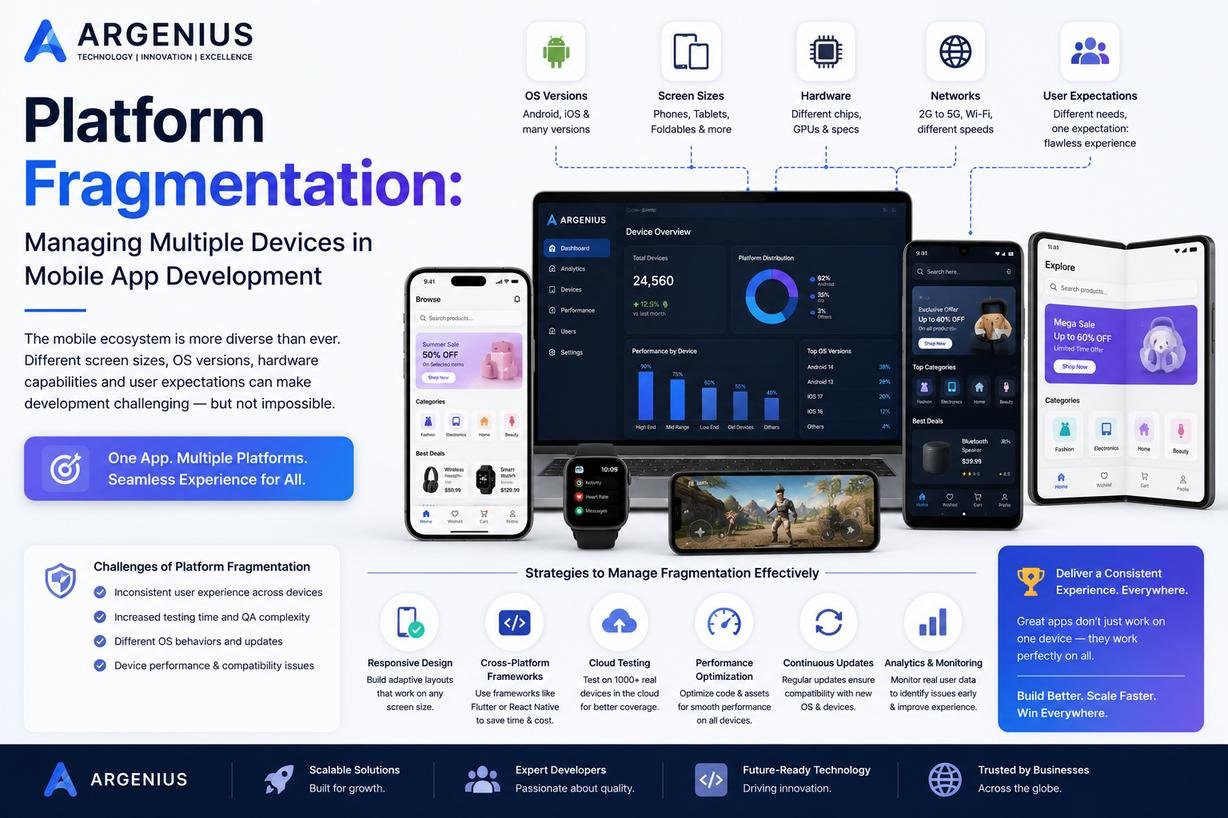
Platform fragmentation is one of the biggest challenges in mobile app development. Learn how developers manage different devices, operating systems, screen sizes, and hardware capabilities to build reliable, high-performing mobile applications.
Introduction
Launching a mobile application today is far more complex than simply making it work on one smartphone. Millions of users access apps using devices with different screen sizes, processors, RAM capacities, operating system versions, display resolutions, manufacturers, and hardware capabilities. An application that performs perfectly on one device may crash, lag, or display layout issues on another.
This challenge is known as platform fragmentation, and it is one of the most important considerations in modern mobile app development.
Android alone is available on thousands of devices from manufacturers such as Samsung, Xiaomi, OnePlus, Vivo, Oppo, Motorola, Google, and Realme. Each device can have different hardware specifications, custom user interfaces, and Android versions. Even within Apple's ecosystem, developers must support multiple iPhone models, iPads, varying screen sizes, and frequent iOS updates.
Ignoring platform fragmentation can lead to poor user experiences, negative reviews, increased maintenance costs, and lost business opportunities. Successfully managing it requires thoughtful planning, responsive design, extensive testing, optimized code, and a scalable development strategy.
In this guide, we'll explore what platform fragmentation is, why it matters, the challenges it creates, and the best practices developers use to ensure apps perform consistently across multiple devices.
At Argenius, we build mobile applications that are optimized for a wide range of devices, ensuring users receive a reliable and seamless experience regardless of the smartphone or tablet they use.
What Is Platform Fragmentation?
Platform fragmentation refers to the existence of multiple device configurations within the same operating system ecosystem.
Differences may include:
- Screen sizes
- Display resolutions
- Operating system versions
- Device manufacturers
- RAM capacity
- CPU architecture
- GPU performance
- Storage availability
- Camera capabilities
- Hardware sensors
Developers must account for these variations when designing and testing applications.
Why Platform Fragmentation Matters
A mobile application should provide a consistent experience for every user.
If fragmentation isn't handled properly, users may experience:
- App crashes
- UI alignment issues
- Slow performance
- Battery drain
- Broken layouts
- Missing features
- Device compatibility problems
- Negative app reviews
These issues directly affect user satisfaction and business growth.
Android vs iOS Fragmentation
Android Fragmentation
Android experiences higher fragmentation because many manufacturers produce Android devices.
Challenges include:
- Multiple Android versions
- Different screen sizes
- Custom manufacturer interfaces
- Wide range of hardware configurations
- Different chipsets
- Varying camera systems
Supporting this diversity requires extensive compatibility testing.
iOS Fragmentation
Apple controls both hardware and software, resulting in less fragmentation.
However, developers still need to support:
- Multiple iPhone generations
- iPads
- Different screen resolutions
- New iOS releases
- Device-specific features like Dynamic Island or Face ID
Although easier to manage than Android, iOS fragmentation still requires attention.
Common Types of Platform Fragmentation
Screen Size Fragmentation
Modern devices range from compact smartphones to foldable devices and tablets.
Examples include:
- Small phones
- Standard smartphones
- Large phones
- Foldables
- Tablets
Applications must adapt automatically to every screen size.
Operating System Fragmentation
Not all users update their devices immediately.
Developers often need to support multiple OS versions simultaneously.
Examples:
- Android 13
- Android 14
- Android 15
Similarly, many users continue using older iOS versions.
Hardware Fragmentation
Every device offers different hardware capabilities.
Examples include:
- RAM
- Storage
- Processor
- Camera quality
- GPU
- Sensors
- Battery capacity
Applications should scale their performance according to available resources.
Manufacturer Customization
Android manufacturers customize the operating system with their own interfaces.
Examples include:
- Samsung One UI
- Xiaomi HyperOS
- OnePlus OxygenOS
- Motorola My UX
These customizations can affect notifications, permissions, battery optimization, and background services.
Challenges Caused by Platform Fragmentation
Managing fragmentation introduces several technical challenges.
These include:
- UI inconsistencies
- Performance differences
- API compatibility
- Hardware limitations
- Increased testing effort
- Longer development cycles
- Higher maintenance costs
- Complex debugging
Proper planning helps minimize these challenges.
Best Practices for Managing Platform Fragmentation
Use Responsive UI Design
Responsive layouts automatically adjust to different screen sizes and orientations.
Good practices include:
- Flexible layouts
- Adaptive typography
- Dynamic spacing
- Responsive images
- Auto-scaling components
This ensures a consistent user interface across devices.
Support Multiple Screen Densities
Applications should provide optimized assets for various display densities.
Benefits include:
- Sharper graphics
- Better readability
- Improved visual quality
Target Multiple OS Versions
Instead of supporting only the latest operating system, define a realistic minimum supported version based on your target audience.
This increases compatibility while balancing development effort.
Optimize Performance
Performance optimization is essential across devices with different hardware capabilities.
Recommended techniques include:
- Lazy loading
- Image compression
- Efficient memory management
- Background task optimization
- API caching
- Reduced network requests
Feature Detection Instead of Device Detection
Instead of identifying a specific phone model, check whether a required feature is available.
Examples:
- Camera support
- NFC availability
- Biometric authentication
- GPS access
This approach improves compatibility and future-proofs the application.
Importance of Device Testing
Testing is the most effective way to identify fragmentation-related issues.
Developers should test on:
- Different screen sizes
- Multiple Android versions
- Various iPhone models
- Tablets
- Budget devices
- Flagship devices
- Slow network conditions
Combining physical devices with cloud-based device testing helps improve coverage.
Performance Optimization Across Devices
Different devices have different hardware capabilities.
Developers should:
- Reduce memory consumption
- Optimize animations
- Compress media files
- Minimize background processing
- Optimize API responses
- Use efficient caching strategies
These improvements enhance the user experience on both high-end and entry-level devices.
Accessibility Across Devices
Accessibility is another important aspect of compatibility.
Applications should support:
- Screen readers
- Dynamic font sizes
- High-contrast modes
- Voice navigation
- Keyboard navigation (where applicable)
- Touch accessibility
Building accessible applications benefits all users.
How Cross-Platform Frameworks Help
Modern frameworks simplify support for multiple devices.
Popular options include:
- Flutter
- React Native
- .NET MAUI
Benefits include:
- Shared codebase
- Consistent UI
- Faster updates
- Reduced maintenance
- Easier testing
However, developers must still validate behavior across different hardware configurations.
Common Mistakes Businesses Make
Many businesses underestimate the complexity of supporting multiple devices.
Avoid these common mistakes:
- Testing only on flagship smartphones
- Ignoring older operating system versions
- Designing only for one screen size
- Using fixed UI dimensions
- Skipping performance optimization
- Not planning for foldable devices
- Ignoring tablet layouts
- Overlooking accessibility
- Delaying compatibility testing until the end of development
- Assuming all Android devices behave the same
Addressing these issues early reduces development costs and improves app quality.
Why Businesses Choose Argenius
At Argenius, we build mobile applications that deliver a consistent experience across Android and iOS ecosystems. Our development process includes responsive UI design, compatibility testing, performance optimization, accessibility reviews, and quality assurance across a wide range of devices.
From smartphones and tablets to foldable devices, we ensure your application performs reliably regardless of hardware specifications or operating system versions. Our goal is to help businesses launch scalable mobile apps that maximize reach, user satisfaction, and long-term success.
Final Thoughts
Platform fragmentation is an unavoidable reality of modern mobile app development, especially within the Android ecosystem. Devices differ in screen sizes, hardware capabilities, operating system versions, and manufacturer customizations, making compatibility a critical part of the development process.
Rather than treating fragmentation as a problem, successful businesses view it as a design and engineering challenge that can be solved through responsive interfaces, performance optimization, comprehensive testing, and scalable architecture.
By planning for multiple devices from the beginning, organizations can reduce maintenance costs, improve user satisfaction, and reach a broader audience without compromising quality.
At Argenius, we help businesses build robust mobile applications that perform consistently across diverse devices, ensuring every user enjoys a fast, secure, and reliable experience.
Frequently Asked Questions
What is platform fragmentation?
Platform fragmentation refers to the existence of multiple devices, screen sizes, hardware configurations, and operating system versions within the same platform, making app development and testing more complex.
Why is Android more fragmented than iOS?
Android is used by many manufacturers, each offering different hardware and customized software experiences. Apple controls both hardware and software, resulting in a more consistent ecosystem.
How do developers manage platform fragmentation?
Developers use responsive UI design, adaptive layouts, feature detection, extensive testing, performance optimization, and support for multiple operating system versions.
Does Flutter solve platform fragmentation?
Flutter simplifies UI consistency across platforms through a shared codebase, but developers still need to test on different devices and optimize for varying hardware capabilities.
Can Argenius develop apps compatible with multiple devices?
Yes. Argenius develops Android and iOS applications optimized for different screen sizes, operating system versions, and hardware configurations to ensure a seamless user experience.